MODARTT AIRTEQ - User Manual
Welcome
Congratulations on your purchase of Airteq, created by the MODARTT team.
Do not hesitate contacting us if you need any assistance on how to install and use the software. You are also welcome to provide feedback and suggestions - www.modartt.com/support
Table of contents
- 1. Introduction
- 2. Installing and starting Airteq
- 2.1. Installer package download
- 2.2. Installation for
Windows - 2.3. Installation for
macOS - 2.4. Using Airteq standalone
- 2.5. Using the VST/VST3/AU/AAX plug-in
- 2.6. Hardware requirements
- 2.7. Adapt Airteq to your hardware (standalone version)
- 2.8. Adapt Airteq to your
MIDIsetup - 2.9.
MIDI Learnfeature - 2.10. Quickly loading
fxp(settings) andMIDIfiles - 2.11.
MIDIfile player (standalone version) - 2.12. Interface magnification
- 2.13. Light and Dark mode
- 2.14. Chord detection
- 3. Presets
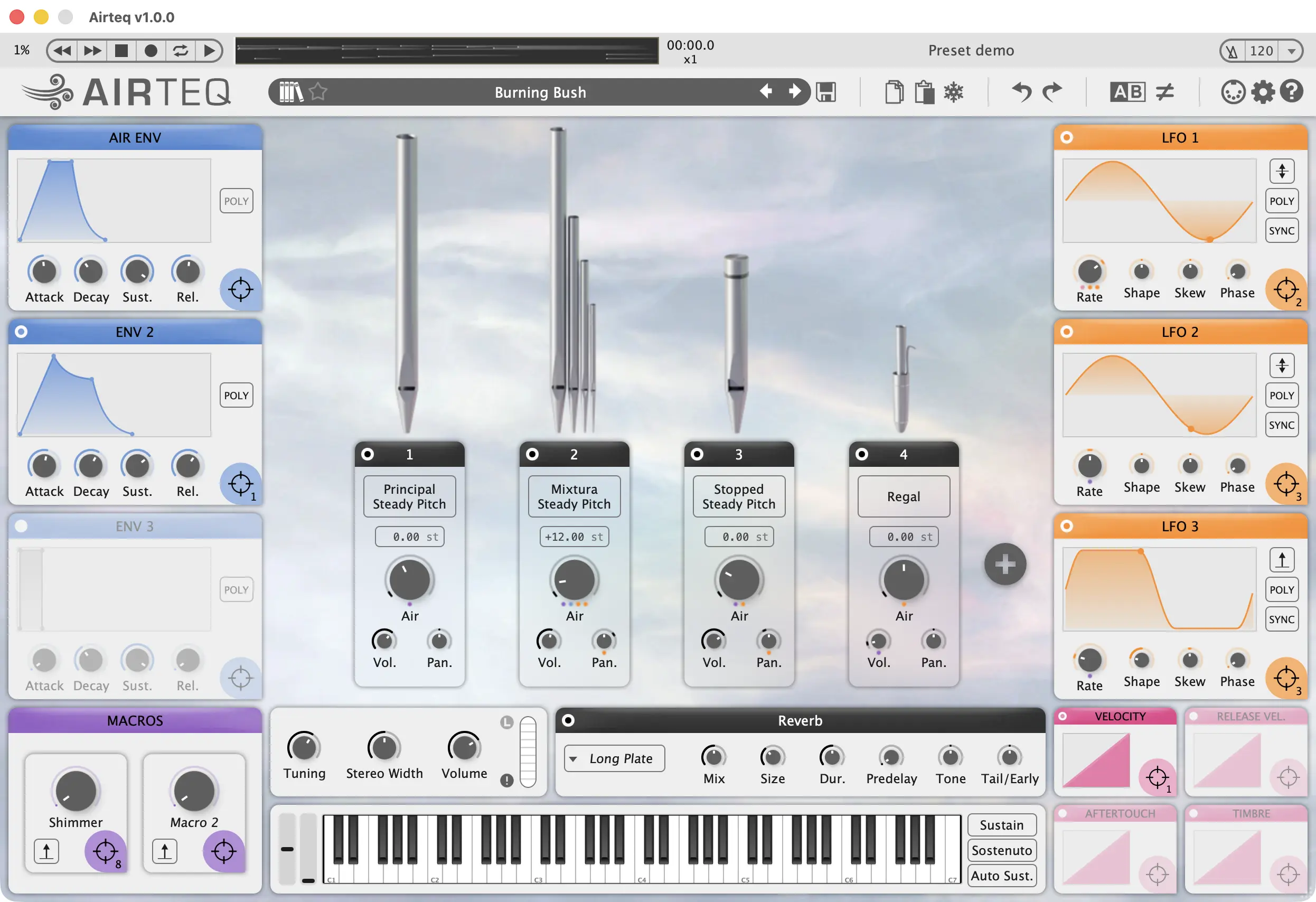
- 4. Airteq interface overview
- 5. Airteq stop and pipes
- 6. Modulators
- 7. GUI MIDI Controls
- 8. Reverberation
- 9. List of built-in presets
- 10. Special acknowledgements
- 11. Company
- 12. Intellectual property
1. Introduction
1.1. Dynamic Aerophone Modeling Technology (DAM)
Our physical model of the pipe organ, present in Organteq, has been refined in order to accurately respond to the continuous control of the Air supply of each stop and pipe. This real-time control of the Air gives access to a completely new palette of unsuspected (but always physical!) sound textures. We called it Dynamic Aerophone Modeling - or DAM. This advanced physical model for air flow requires a performant multicore cpu for realtime rendering, as frontier physical modeling comes with some computational costs.
Although the simulated sound remains rooted in the organ pipe physics, Airteq transforms it into something entirely different: an instrument designed for creative exploration.
Airteq isn't about imitation. It's about opening the door to new sonic territories: cinematic atmospheres, evolving textures and expressive sonic exploration.
1.2. What makes Airteq outstanding
Airteq is not a sample library and not a traditional synthesizer. By being physically modelled, Airteq offers several advantages:
- Superior playability. In Airteq, modulation does not simply move a filter: it changes the behavior of the sound source itself, influencing the model as it sounds.
- Storage just 50 MB (Megabytes). No samples are included thanks to our physically modeled technology (DAM) which only relies on computing power.
- Customizable instrument. Different families of virtual pipes are available, each with its own timbre. Combine flutes, reeds and mixtures that respond differently to the way you modulate the airflow.
- Superior expressivity. Airteq responds to velocity, pitch bend and aftertouch, and fully supports MIDI Polyphonic Expression (MPE).
1.3. Features in short
Airteq offers new ways of shaping sound. It turns airflow into a creative parameter, allowing musicians to continuously control, modulate and transform the Air supply of each virtual pipe in real time. Many exciting features result from this:
- Several families of virtual pipes, offering different ways to respond to the varying Air supply, thanks to the technology of Dynamical Aerophone Modeling which automatically modifies in real time the model parameters.
- Timbre modification of repeated notes, due to the fact that air columns are already vibrating instead of being still.
- Unique instrument by selecting different types of pipes (flute-like, reed-like and mixturas) in the five available slots.
- Elaborate modulation of the Air supply via configurable envelopes and/or LFOs.
- Expressive control of chosen parameters via customizable Macros.
- Convenient playing modes with automatic sustain of selective notes.
- Quick and easy MIDI learn and mapping of available controls as velocity, pitch bend, aftertouch and continuous CCs from keyboards, MIDI Polyphonic Expression (MPE) devices, breath/wind controllers, and more.
- Fine tuning of each pipe.
- More than 170 carefully crafted presets designed to dive into the instrument’s creative possibilities.
- Tunable reverb module, from a pure anechoic dry sound to a giant spacious wet sound.
2. Installing and starting Airteq
Airteq works on computers equipped with Windows, macOS or Linux. You can use Airteq in standalone mode or as a plug-in instrument in a VST, VST3, Audio Units or AAX host. Airteq runs in 64-bit mode only. We recommend visiting www.modartt.com/airteq where you will find the latest information, a detailed FAQ page and a tutorial on how to connect your hardware.



2.1. Installer package download
Once registered as a user on the modartt.com/user_area, you will be able to log in and download the binary archive located in the Download section.
2.2. Installation for Windows
Execute the installation program file airteq_setup.exe. Activation is required when launching Airteq for the first time. Just follow the on-screen instructions. ASIO drivers are necessary for obtaining a low latency. If using a soundcard that is not distributed with its own ASIO drivers, you can download free third-party ASIO drivers at https://www.asio4all.com.
2.2.1. Optimization
If you experience pops and cracks when playing, watch the audio load and CPU frequency in Options ► Perf:
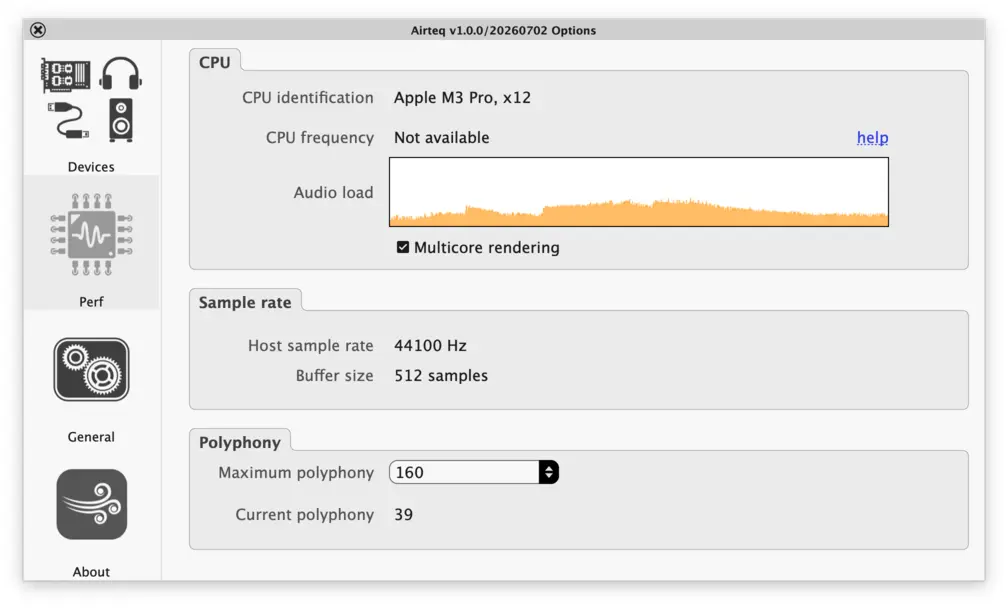
Red bars in the graphic indicate an overload. In that case, look at the displayed CPU frequency. If this frequency varies or stays below the normal frequency of your CPU, it comes from the Power Management setting of your computer, which should be set to High Performance.
2.3. Installation for macOS
Click on the Airteq package and follow the instructions. Activation is required when launching Airteq for the first time. Ensure to follow the on-screen instructions.
2.4. Using Airteq standalone
Using Airteq standalone is simple. Launch Airteq and specify your audio and MIDI devices settings in the Options ► Devices dialogue box. You are then ready to play.
2.5. Using the VST/VST3/AU/AAX plug-in
Airteq can be loaded by any VST, VST3, Audio Units or AAX host. You will need to specify, inside the host, your MIDI device and the driver you are using.
2.6. Hardware requirements
Airteq can be used with any MIDI compatible keyboard.
The requirements for using Airteq successfully are:
- Recent
CPU - 512 MB
RAM ASIOcompatible sound card and drivers (concerns Windows users only)- Internet connection (if activating the software using quick online method, otherwise see modartt.com/faq)
Windows10 (64-bit) or later,macOS11.0 or later,Linux(x86andARM).
2.7. Adapt Airteq to your hardware (standalone version)
When running the standalone version, click on the Options button. A window, containing the following sections, appears: Devices, Perf, General and About.
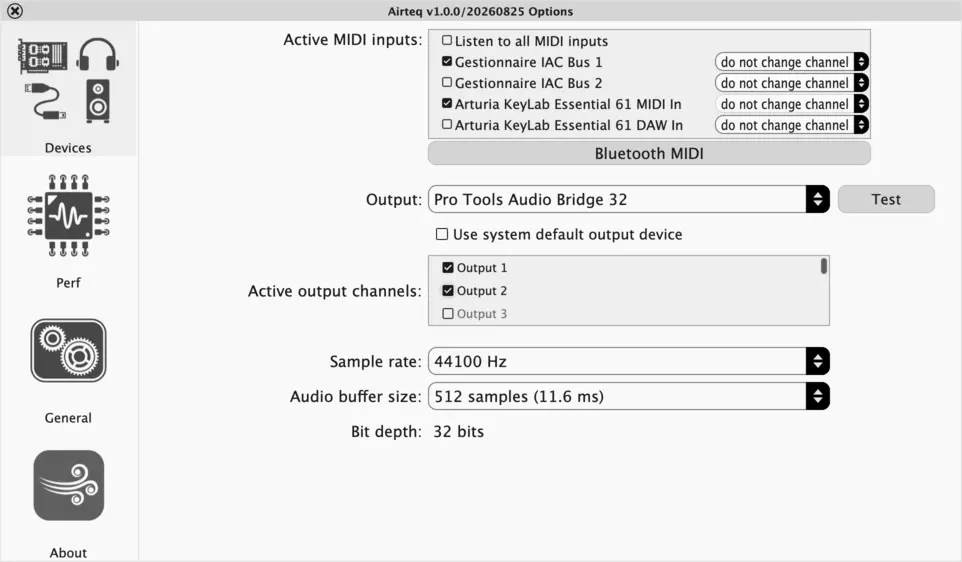
The Devices section lets you select your hardware keyboards, audio device and related driver (Audio device type), output channels, sample rate and audio buffer size.
If running Windows, you should select an ASIO driver in order to minimize latency. If intending to play on a MIDI compatible keyboard, you should select an audio buffer size which generates a latency of less than 8ms.
The audio load graph lets you check how your computer performs. If you encounter performance issues, you will need to lower the sample rate.
2.8. Adapt Airteq to your MIDI setup
The MIDI Mapping window of Airteq can be opened either by clicking on the MIDI button in the upper bar of the interface, or with the keyboard shortcut M.
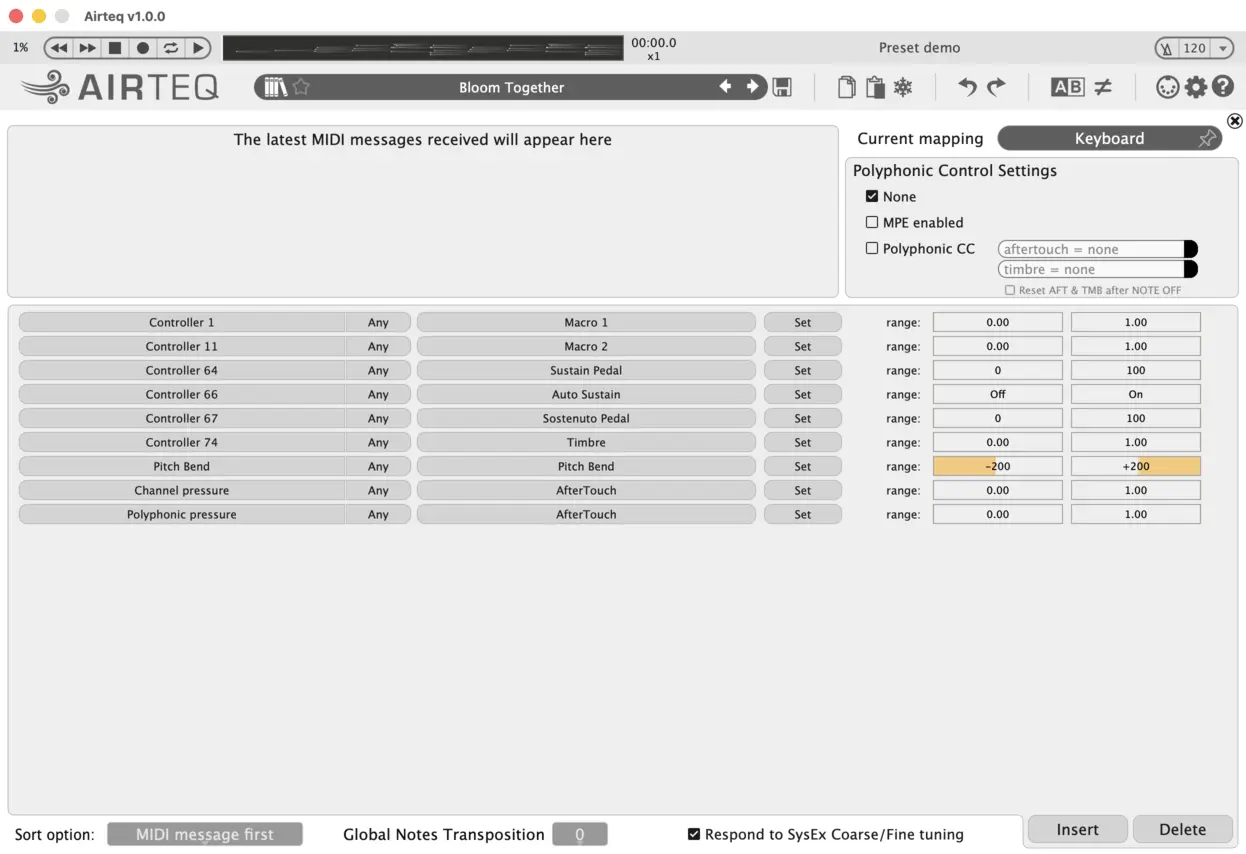
Airteq comes with four built-in MIDI mappings:
- Keyboard: adapted for regular MIDI keyboards with Pitch Bend and Modulation Wheel
- MPE: adapted for MPE controllers
- Wind controller: a good starting point to use wind controllers such as Roland's Aerophone, Akai's EWI, Aodyo's Sylphyo, ...
- Breath controller: a good starting point to use wind controllers such as TEControl's, MRTAudio's, AirMotion's, ...
The name of the current MIDI Mapping appears on the upper right of the window. Clicking on it opens a dropdown menu where you can:
- select another
MIDI mapping SaveorSave as...yourMIDI mappingconfigurationPinorUnpinaMIDI mappingBrowsethe list ofMIDI mapping
MIDI window can be detached from the main window by hovering the mouse at the top of the window, then clicking and dragging it.
MIDI mapping it is advised to Pin it.
2.8.1. MPE and Polyphonic CC
Airteq supports MIDI Polyphonic Expression (MPE) and Polyphonic CC. These allow per-note control of aftertouch, pitch bend and timbre, enabling highly expressive and detailed sound shaping.
Both MPE and Polyphonic CC can be enabled or disabled in the MIDI Mapping window.
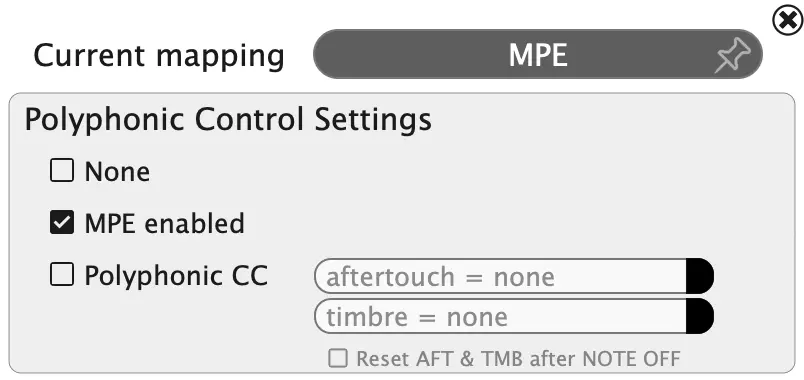
MPE, allowing immediate use with compatible expressive controllers. It is also embedded by default with built-in presets that contain MPE in their name.
MIDI Mapping with a preset specifically designed for MPE may result in reduced expressivity, and even unintended sound behavior.
MPE is enabled in the current MIDI Mapping, the MIDI icon displays the label MPE, indicating that per-note expression is active.

2.8.2. MIDI mapping items
The MIDI mapping is made of several MIDI mapping items. Each item assign a MIDI event (Note On, Note Off, CC, Program Change, Channel Pressure, Pitch Bend, etc...) to an Airteq internal action, with MIDI channel filtering and bounds restrictions options.
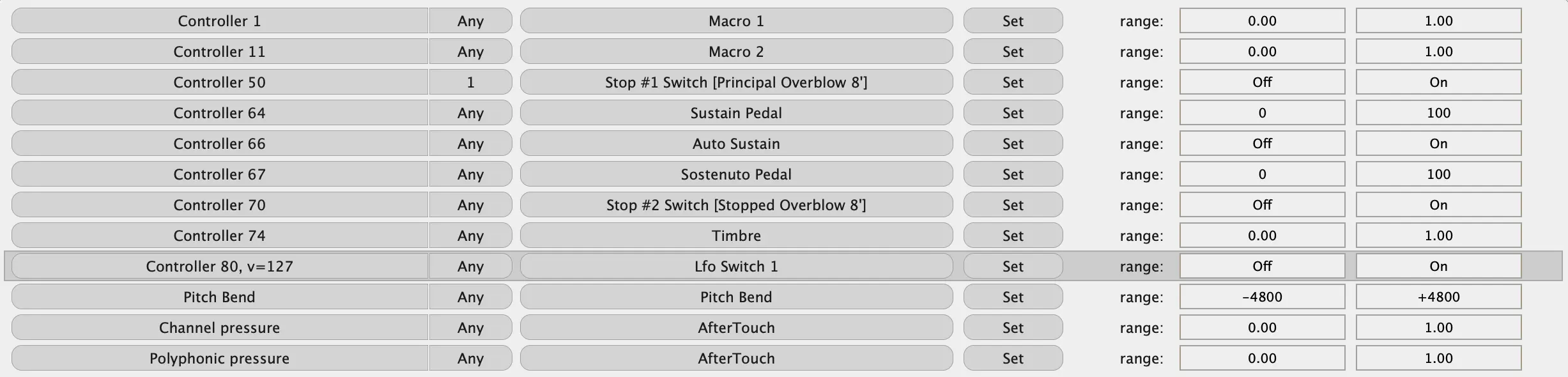
MIDI controller by clicking on the element while holding the OS specific modifier key (Windows: ctrl + click, macOS: ⌘ + click). See the MIDI Learn section.
MIDI mapping items by three options: MIDI channel first, MIDI message first or Param first.
You can restrict the input bounds of the Controle Change MIDI message as illustrated below. It is usefull for defectuous MIDI hardware that do not send value within the full range [0, 127].

2.9. MIDI Learn feature
You can assign Airteq parameters to MIDI controllers such as knobs, sliders or other controls available on your keyboard or any connected MIDI device.
2.9.1. Quick assignment
Any on-screen UI item in Airteq can be quickly assigned using the MIDI Learn feature:
ctrl + click(Windows) or⌘ + click(macOS) on the UI item to triggerMIDI Learnmode- move or touch the controller you want to link
MIDI controllers, you can therefore control in real time every individual Air gauge, or even create your own additional macros by assigning multiple parameters to a single MIDI control.
In case of conflicts with existing Action mapping items involving either the selected UI action or the incoming MIDI event, you can Keep all, Replace or Cancel the MIDI Learn.
The MIDI Learn mode can also be triggered by right-click on the UI item and selecting MIDI ► Assign MIDI Control.
2.9.2. Additional information
More advanced routing and mapping possibilities are available in the MIDI Mapping section.
Some MIDI controls are reserved and cannot be assigned:
- controls
6,38,96–101(used forRPN/NRPNparameters) - controls
120–127(reserved for reset operations such as All Notes Off) - controls
32–63(reserved for 14-bit precision controllers)
By default, Airteq responds to SysEx Coarse and Fine Tuning messages, allowing external devices to adjust its tuning. This behavior can be disabled in the lower section of the MIDI Mapping window.
2.10. Quickly loading fxp (settings) and MIDI files
You can load fxp (and MIDI files with the standalone version) quickly by dragging each file at a time, from the file manager, email client or web browser, onto the Airteq interface.
2.11. MIDI file player (standalone version)
The Airteq standalone version is equipped with a MIDI player that lets you play and record MIDI files. You can load several MIDI files via File ► Load MIDI file and even create your own MIDI Playlist via File ► Manage MIDI Playlist. A long left-click on the MIDI score lets you zoom-in for a better precision.
2.11.1. Airteq MIDI file & built-in MIDI Mapping
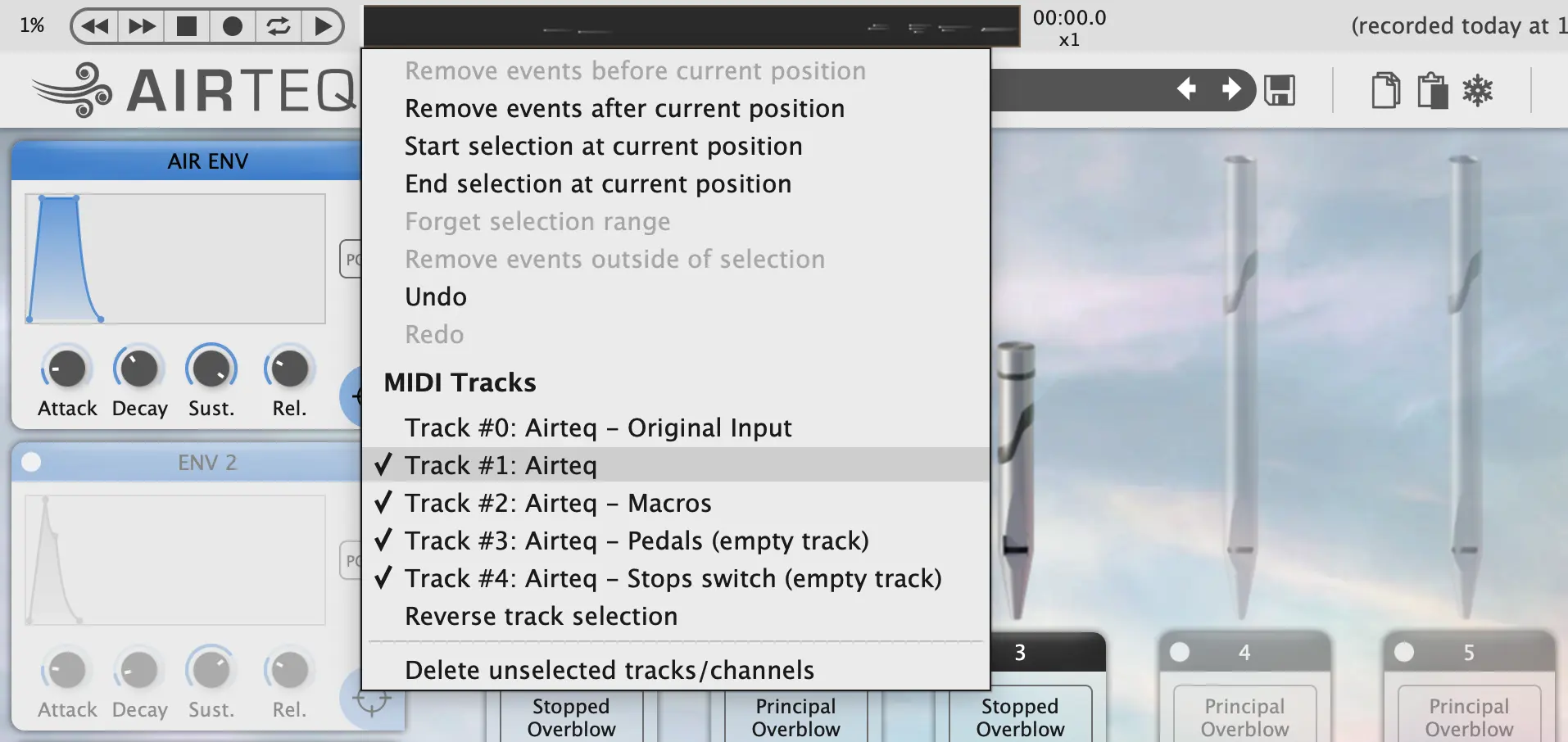
Any MIDI stream recorded by Airteq standalone is recorded as a 5-tracks MIDI file:
- Track #0 contains the original input.
- Track #1 contains the notes played, as well as
Gesturesreal-time events - possiblyMPE. - Track #2 contains the
Macrosreal-time events. - Track #3 contains the
Pedalsreal-time events. - Track #4 contains the
Stop Switchesreal-time events.
MIDI file.
Such MIDI file recorded through Airteq is recognizable by its 5-tracks structure (right-click on the white part of the MIDI Player):
When loaded back in Airteq standalone, such a MIDI file is played by overriding the current MIDI mapping and uses an internal built-in MIDI mapping.
MIDI file recorded with Airteq must be read with the preset/setting (fxp file) with whom it has been recorded, otherwise the real-time events, such as macros events, might be misinterpreted!
2.11.2. Playback speed
You can adjust the playback speed by clicking on x1 ("times 1"). A menu will appear where you can choose another value or enter any value between 0.1 and 10. Alternatively, click on x1 and drag the mouse to get the value you want.

2.11.3. Auto repeat and loop selection
Click on the autorepeat button to toggle the Auto Repeat mode on the current MIDI file. You can select a sub-sequence of the MIDI file to loop on by dragging the transport bar of the MIDI player on one end of your sequence, then right-click to Start/End selection at current position. You can also select a sub-sequence by a long left-click on the midi player: drag the transport bar and press ; once to define the beginning of the selection, press ; twice to define its end.

2.11.4. Record and Save your performance
Click on the record button to start recording your performance live.
Save your MIDI file by opening the File menu. There you can also export your recording to a WAV, FLAC or MP3 audio file.
2.11.5. Brilliant performance lost?
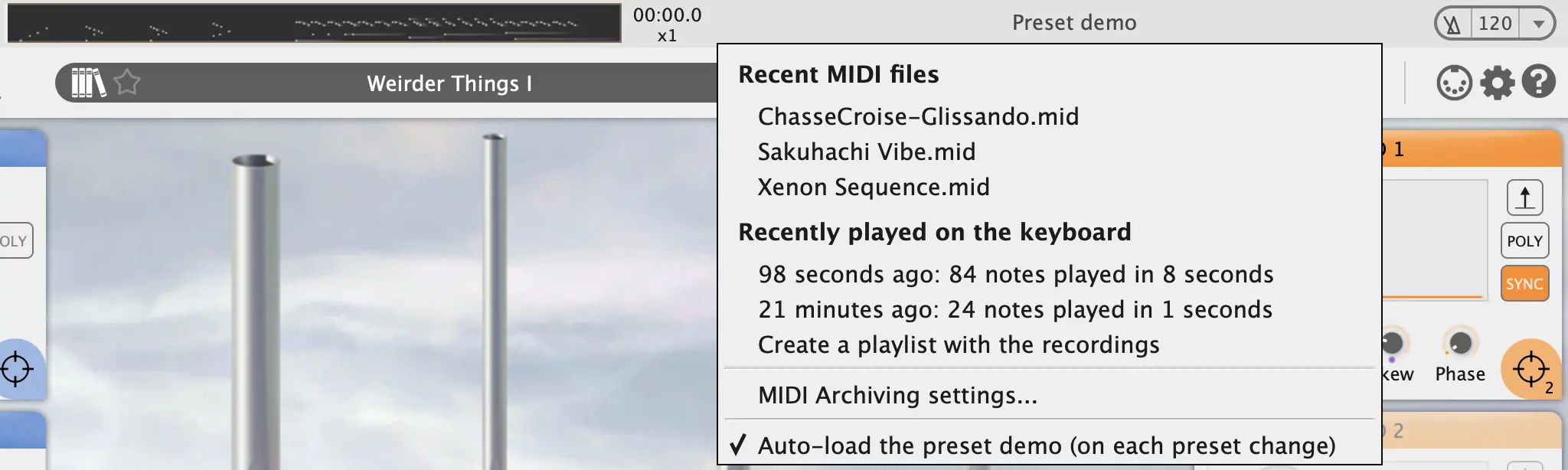
At any time, you can retrieve your recent performances via File ► Recently played on the keyboard. Particularly useful when after a brilliant performance you think “too bad I didn’t record this”! Well, Airteq did it for you: just load the latest Recently played on the keyboard and save/export it to a regular MIDI/AUDIO file. It’s as simple as that!
For less recent performances, a MIDI Archiver is available, access the settings at the bottom of the Recently played on the keyboard menu.
Recently played menu by clicking on the actual MIDI file name in the upper bar.
2.11.6. Step by step in your MIDI file
In the standalone version, for exploring your MIDI file step by step, forwards or backwards, use the computer keyboard right or left arrows to play single notes or chords. Using right click in the MIDI player, you can remove events placed before or after the current position.
2.12. Interface magnification
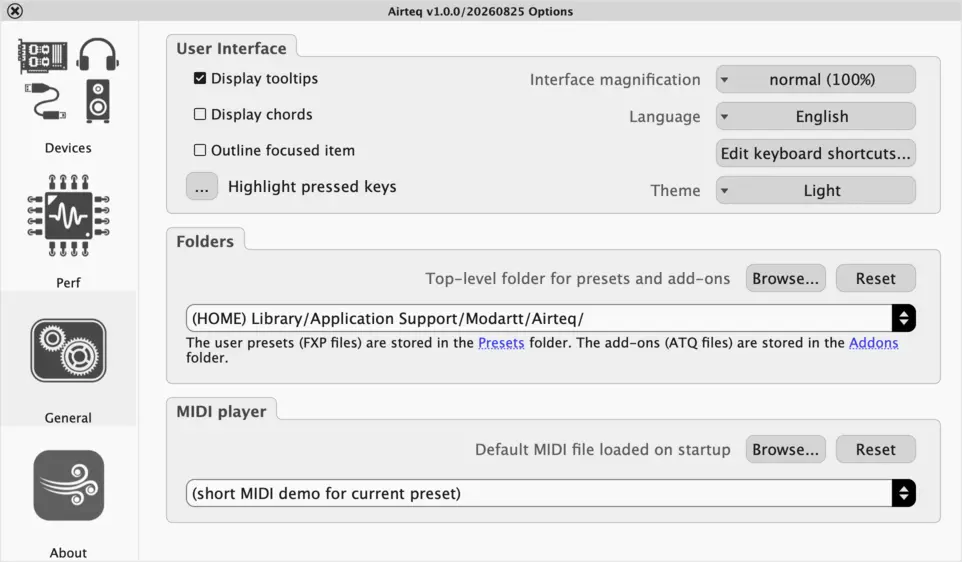
The Airteq interface is resizable, making it comfortable to work with any display size. Click on Options ► General and select the size in the Interface magnification menu, or simply use the handy keyboard shortcuts +/-:
2.13. Light and Dark mode
The Airteq interface comes with two variants: a light and a dark theme. Click on Options ► General and select the theme, or simply use the handy keyboard shortcuts D:
2.14. Chord detection
Airteq can detect and display the chord currently being played. To enable this feature, select Options ► General ► Display Chords.
When active, the detected chord name is displayed in the bottom-right corner of the interface.
3. Presets
An Airteq preset gathers all the settings and parameters accessible through the main interface. Hence, a preset gathers:
- the stops settings
- the modulation settings
- the reverberation settings
- the MIDI Mappings settings
- the output settings
An Airteq preset file is an fxp, and has the file extension .fxp.
3.1. Preset Banks
A bank is a set of presets that are located in a given folder, except the factory bank which contains all the built-in presets.
3.1.1. The Airteq preset bank folders
The easiest way to find the Airteq folders is to click on the small folder images to the right of All banks in the preset manager window. The Airteq folder contains one sub-folder Presets: this is where to store the user defined banks. Each bank is itself a folder that contains presets in the fxp file format.
3.1.2. Importing fxp files
There are two ways to import fxp files:
- Drag and drop the file onto the interface,
- Copy the file onto the appropriate folder.
3.2. Preset Tags
Each preset can be associated to one or several tags. A tag is an optional text metadata embedded within a preset.
3.2.1. Built-in and custom tags
Airteq comes with many built-in tags: MPE, Percussive, Aeolian, Pad, etc.
You can also create your own custom tags in the preset manager window.
3.3. Preset Sound Types
Each preset belongs mainly to one Sound type. A Sound type is a built-in category that describes the general sonic character and intended use of a preset.
3.3.1. Available sound types
Airteq provides three predefined sound types:
- Natural Pipes — Presets that evoke the sound of real pipe or wind instruments, or at least instruments that could plausibly exist. They retain a strong acoustic character and sense of realism.
- Cinematic Textures — Presets that exploit Air modulation to move beyond the sound of traditional acoustic instruments. They are often used to create evolving atmospheres, abstract soundscapes and cinematic ambiences.
- Electronic Music — Presets designed for modern electronic music production. They often take advantage of the perfectly tuned nature of Steady Pitch pipes to create synth-like textures, basses, leads and pads.
Unlike tags, sound types cannot be edited, removed or created by users.
3.4. General commands
In Airteq you can modify and create your own presets, save them and share them with other users. The following commands are located at the top of the interface.

- The
preset manager(library) button toggle the preset manager window. - The
favorite(star) button marks the current preset as favorite. - The
savebutton allow you to edit and save your new preset. - The
copyandpastebuttons allow you to select and copy/paste a subset of the current parameters from one preset to another. Right click on the copy button allows to copy without changing the previous selection. - The
freezecheckbox allows you to select the parameters that you want to keep unchanged when changing preset. This is a very convenient feature for “transporting” settings from one preset to another. - Using the
undo/redocommands, you can at any time undo and redo the changes you have made: up to 100 undos are possible. A right click on the button shows you the last modification. - The
ABbutton allows you to switch between two presets A and B, one being in the foreground while the other is in the background. The(un)equalbutton next to them appears asunequalas soon as A and B are different. Clicking the(un)equalbutton copies the foreground preset into the background preset. A right click on the AB button lists the differences between A and B. A and B presets have their own undo/redo stack.
3.5. Favorite presets
You can mark a preset as a favorite either by:
- clicking on the
Favicon (star) next to the preset name on the main window. - clicking on the
Favicon next to the preset name in the preset manager window.
3.6. Preset Manager
You can open the Preset Manager by clicking the Preset Manager button (library icon), or with the keyboard shortcut L.
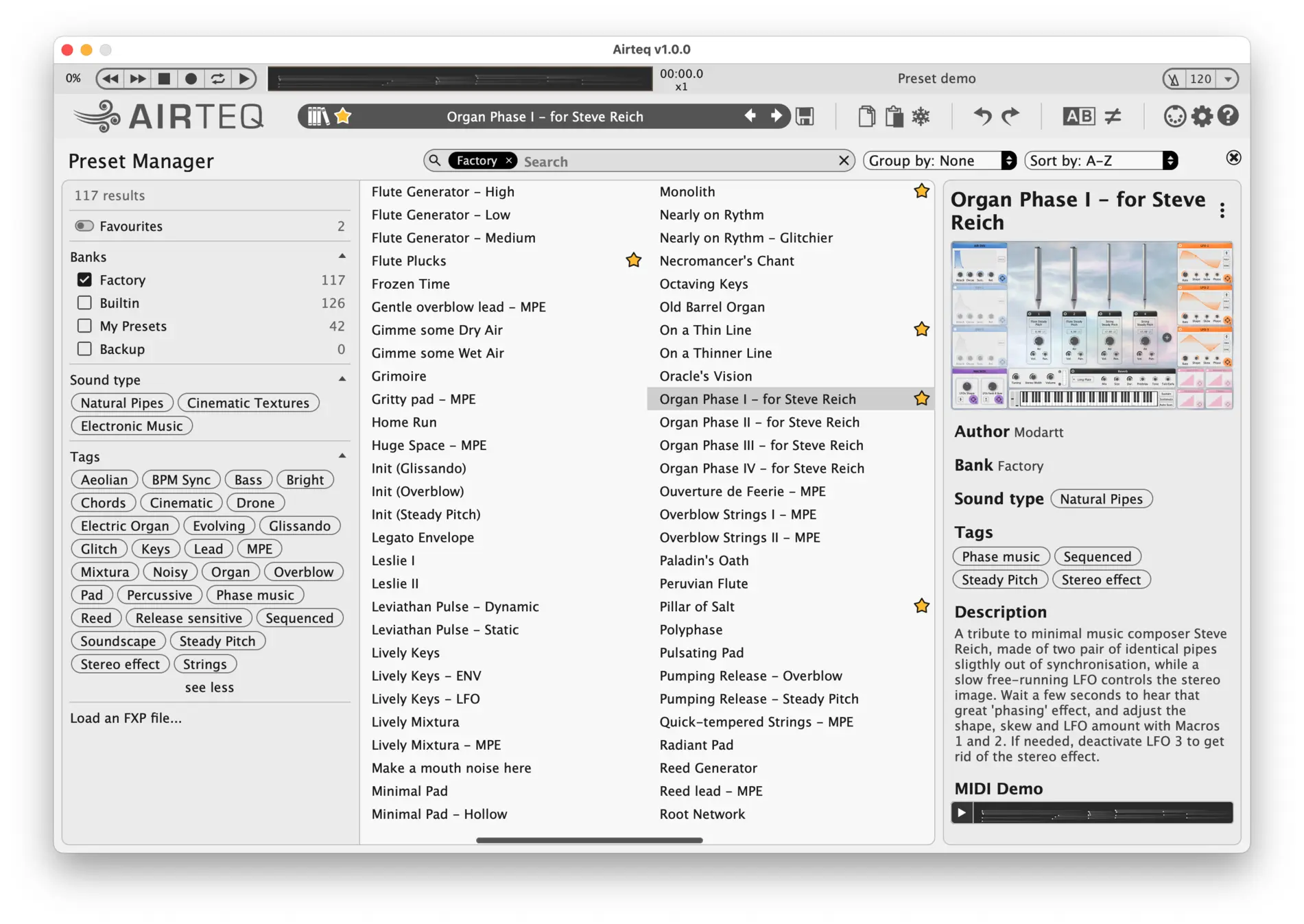
The Preset Manager lets you browse, filter, sort and edit Airteq presets information (description, tags, MIDI demos, ...).
The top banner contains a search field used to filter presets by name, as well as grouping options (Bank or Sound type) and sorting options (Default or Alphabetical).
The left panel provides access to the available banks, sound types and tags used for filtering, as well as direct loading of .fxp files.
The central area displays, in a multi-column list, all presets matching the current filters. The right panel displays detailed information about the selected preset, including its preview, author, bank, sound type, tags, description and MIDI Demo.
3.6.1. Editing preset information
The right panel displays the information associated with the selected preset, including its author, bank, sound type, tags, description and MIDI Demo.
User presets can be edited directly from this panel. In particular, you can modify their description, manage their tags and record your own MIDI Demo.
MIDI Demo play button to record a new demo sequence for the selected user preset.
3.6.2. Filtering
The left panel provides several filtering options:
- banks
- sound types
- tags
Only presets matching all active filters are displayed in the preset list.
Maj key while clicking to switch to single-selection mode.
3.6.3. Renaming presets
User presets can be renamed by double-clicking their name in the preset list.
3.6.4. Tag editing and creation
Preset tags can be edited from the preset information panel.
Typing a tag that does not already exist automatically creates a new user tag.
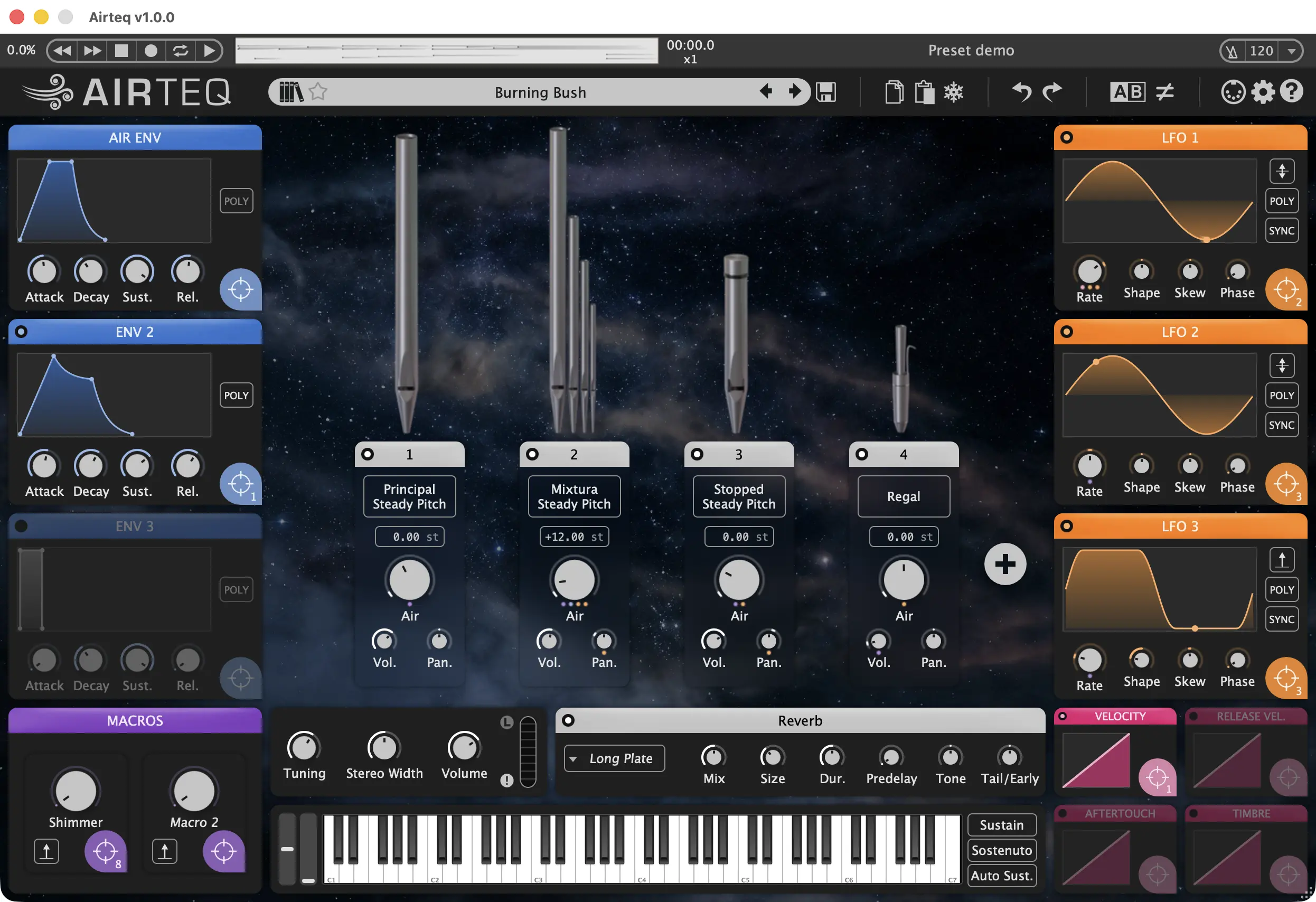
For more information about tags, see the Preset Tags section.
4. Airteq interface overview
This section gives a brief overview of the main Airteq window and its features. Please refer to the specific sections for details.
- The upper bar contains the
MIDIplayer,MIDIfile selection and metronome (for the standalone version only). - The bar below contains:
- the current preset name and preset general commands.
- the buttons
MIDIwindow, Options and Help general commands.
The main panel gathers all the Airteq features:
- The stop slots and their parameters: stop switches, stop selector, stop transposition, individual Air gauge, stop volume, stop pan
- The Add a stop button - if there are less that five instantiated slots
- The modulators: main Air envelope, Envelopes, LFOs, gesture modulators and Macros.
- The reverb panel
- The GUI MIDI controls: pitch bend and mod wheel, a virtual keyboard supporting aftertouch, sustain modes buttons
- A few general sliders (global Tuning, Stereo Width, Volume) and a Limiter switch
You can change any parameter by moving the corresponding slider with the mouse.

Moving the mouse cursor perpendicularly to the slider will make the slider move slowly.

5. Airteq stop and pipes
This section presents general information about what is a stop, how they are categorized in Airteq, and how they react to the controllable Air.
5.1. Stop
A stop is a set of pipes with timbral consistency along the tessitura. It is the basic unit of the sound produced by Airteq - and the only thing Airteq has in common with a regular organ!
5.2. Stop type
Stops are categorized into two main families, depending on the exciter, i.e. how the acoustic vibration is produced:
- flue stop: the acoustic vibration is created by the interaction of an air jet with the pipe labium
- reed stop: the acoustic vibration is creating by the beating reed
In both families, the acoustic vibration is affected by the pipe resonances. A wide variety of exciter shapes and pipe shapes yields a wide variety of timbres.
5.2.1. Flue stops
Flue stops are mainly made of cylindrical resonator:
- flute or wide diameter: these pipes produce a soft sound with a pronounced fundamental and less harmonics
- principal or medium diameter: the sound is balanced
- string or narrow diameter: these pipes tend to reproduce the sound of bowed string instrument, with a much richer timbre
- bourdon or closed-end pipe: half the length of open-end pipes, they produce a soft sound with a strong odd timbre (odd harmonics)
5.2.2. Reed stops
There is no such a clear classification for reed stops since the variabitity of pipe shapes is more important. We can nevertheless mention some usual pipe shapes:
- trumpet or conical: strong and powerful sound reminding the trumpet
- clarinet or cylindrical: softer sound reminding the instrument of the same name
- regal: reed stop with a very short pipe length, not matching its nominal frequency
5.2.3. Mixture stops
All the stops mentioned so far are single rank stops: there are as many pipes as the number of keys, one pipe per key. Mixture stops combine several flue ranks: one key activates several pipes at different heights. These pipes cannot sound separately.
The ranks of Mixture stops might also have breaks along the tessitura. A break is a change in the pipe height that occures between two keys.
5.3. Air response
Airteq has three type of variable Air response for the Flue pipes:
- Overblow pipes are the most physical Airteq stops in their response to the variable Air. The sound diversity you can obtain with these pipes is extremely interesting - there is a whole sonic universe within a single pipe. Perfectly tuned for the nominal Air value of 0.5, they are otherwise unstable in pitch: their playing frequency increases with the Air. Moreover, they tend to overblow (i.e. octaviate) at high wind values, and might have aeolian sounds at low wind.
- Glissando pipes do not have any overblow nor aeolian sounds. As its name declares, they only fluctuates gently in pitch (and timbre) around the nominal value.
- Steady Pitch pipes are stable in pitch for all Air values. They vary greatly in timbre.
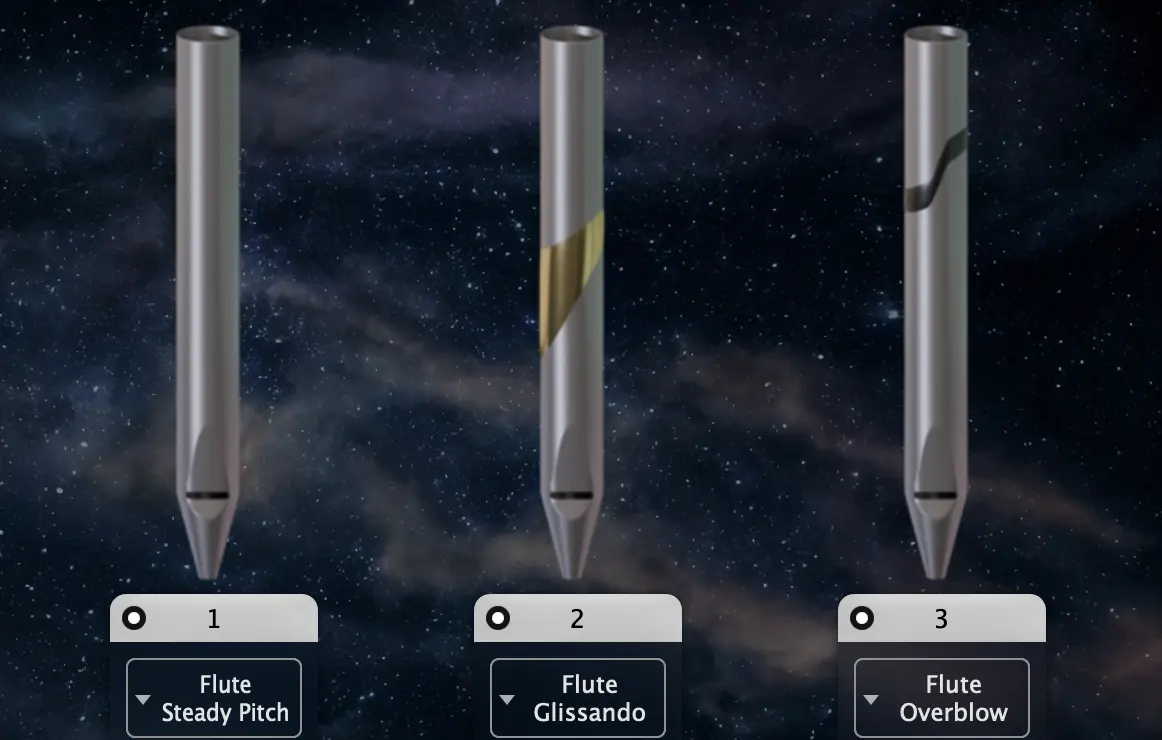
These three categories are symbolised on the pipe image by a specific marquetry:
- the Overblow pipes have an S-shaped marquetry, accounting for their sudden changed of sound regime in the low and high Air values.
- the Glissando pipes have an upward ring marquetry, accounting for their gentle pitch fluctuation.
- the Steady Pitch pipes have a plain texture, accounting for their pitch stability.
5.4. List of Airteq stops
This section lists the 21 available stops, the building bricks of the Airteq sound.
5.4.1. Flue
| Stop Name | Image dark/light | Description |
| Flute Overblow |


|
These pipes have a soft sound and a pronounced fundamental with few strong harmonics. A lot of aeolians sounds occurs at low Air regime, and it overblows for high Air values. |
| Flute Glissando |


|
These pipes have a soft sound and a pronounced fundamental with few strong harmonics. They have a pitch fluctuation of +/- 80 cents around their nominal value. |
| Flute Steady Pitch |


|
These pipes have a soft sound and a pronounced fundamental with few strong harmonics. Stable in pitch for every Air value, they vary greatly in timbre. |
| Principal Overblow |


|
These pipes are well balanced in harmonics, and produce one of the archetypal sound of the organ. A lot of aeolians sounds occurs at low Air regime, and it overblows for high Air values. |
| Principal Glissando |


|
These pipes are well balanced in harmonics, and produce one of the archetypal sound of the organ. They have a variable pitch fluctuation accross the whole range. |
| Principal Steady Pitch |


|
These pipes are well balanced in harmonics, and produce one of the archetypal sound of the organ. Stable in pitch for every Air value, they vary greatly in timbre. |
| String Overblow |


|
These very narrow pipes tend to reproduce the sound of bowed string instrument, with a much richer timbre. A lot of aeolians sounds occurs at low Air regime, and it overblows for high Air values. |
| String Glissando |


|
These very narrow pipes tend to reproduce the sound of bowed string instrument, with a much richer timbre. They have a variable pitch fluctuation accross the whole range. |
| String Steady Pitch |


|
These very narrow pipes tend to reproduce the sound of bowed string instrument, with a much richer timbre. Stable in pitch for every Air value, they vary greatly in timbre. |
| Stopped Overblow |


|
Half the length of *open-end pipes*, they produce a soft sound with a strong odd timbre (odd harmonics). A lot of aeolians sounds and turbulence occurs at low Air regime, and it overblows for high Air values. |
| Stopped Glissando |


|
Half the length of *open-end pipes*, they produce a soft sound with a strong odd timbre (odd harmonics). |
| Stopped Steady Pitch |


|
Half the length of *open-end pipes*, they produce a soft sound with a strong odd timbre (odd harmonics). Stable in pitch for every Air value, they vary greatly in timbre. |
| Stopped Broken |


|
Half the length of *open-end pipes*, they produce a soft sound with a strong odd timbre (odd harmonics). This set is extremely broken, noisy, airy, and produces very pronounced mouth noises (*chiffs*) at the attack. Despite its many defaults, it is an extremely interesting stop ... |
5.4.2. Mixtura
| Stop Name | Image | Description |
| Mixtura Overblow |


|
A four *ranks* Mixtura with only fifths and octaves. It tends to overblow at high Air value. |
| Mixtura Steady Pitch |


|
A four *ranks* Mixtura with only fifths and octaves. Stable in pitch for all *Air* values, it varies greatly in timbre. |
| Acuta Overblow |


|
A three *ranks* Mixtura with fifths, octaves and major thirds. It tends to overblow at high Air value. |
| Acuta Steady Pitch |


|
A three *ranks* Mixtura with fifths, octaves and major thirds. Stable in pitch for all *Air* values, it varies greatly in timbre. |
5.4.3. Reeds
| Stop Name | Image | Description |
| Trumpet |


|
A hard and strong set of reed pipes, supposedly imitative of the brass instrument. |
| Trombone |


|
A hard and strong set of reed pipes, supposedly imitative of the brass instrument. |
| Oboe |


|
A soft and clean set of reed pipes. |
| Regal |


|
A gritty and rattly set of reed pipes. |
5.5. Stop Slot
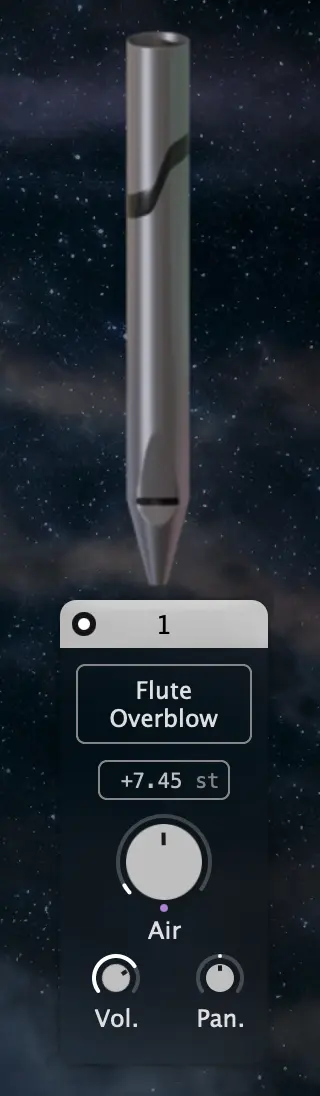
A Stop Slot contains one instantiated stop and its associated controls. Several slots can be used simultaneously to build layered sounds and complex textures. Each slot provides access to the stop selection and to the main parameters that shape its behavior and contribution to the overall sound.
MIDI controller to each stop slot by clicking on the stop header while holding the OS specific modifier key (Windows: ctrl + click, macOS: ⌘ + click).
5.5.1. Stop Selector

The Stop Selector is a drop-down menu that allows you to choose the stop loaded in the slot. Please refer to the Airteq stop list section for more detailed information about the available stops and their sonic characteristics.
5.5.2. Individual Air Gauge
Each stop has an Individual Air Gauge, a knob whose value ranges from 0 to 1. Changing the value of the Air Gauge — either manually or through modulation (for example using macros) — modifies the sonic behavior of the stop. This parameter is a central element of sound design in Airteq.
5.5.3. Stop transposition and fine tune (pitch)
In addition to the timbral variation offered by the pipe shape, the stops are also available at different pitches. Airteq allows any transposition from -36.00 to 36.00 semitones.
The transposition is displayed in semitones (st). For example:
- +3.00 st corresponds to a transposition of three semitones.
- -6.48 st corresponds to a transposition of six semitones and 48 cents downward.
The value is split into two editable fields:
- the left field controls the semitone transposition
- the right field controls the fine detuning in cents
Both fields can be adjusted by clicking and dragging. Dragging upward or to the right increases the value, while dragging downward or to the left decreases it. Vertical movements provide coarse adjustments and horizontal movements provide finer control.
Double-clicking either field resets it to zero.
5.5.4. Volume and Pan
Each stop output volume and pan (Left/Right) can be tuned. They can also be modulated.
Note edit.
6. Modulators
Airteq provides a flexible real-time parameter control system based on Modulators.
The available modulators are:
- one Main Air Envelope
- two Envelopes
- three LFOs (Low Frequency Oscillators)
- four Gesture Modulators
Two additional Macros allow you to control multiple parameters simultaneously using a single knob.
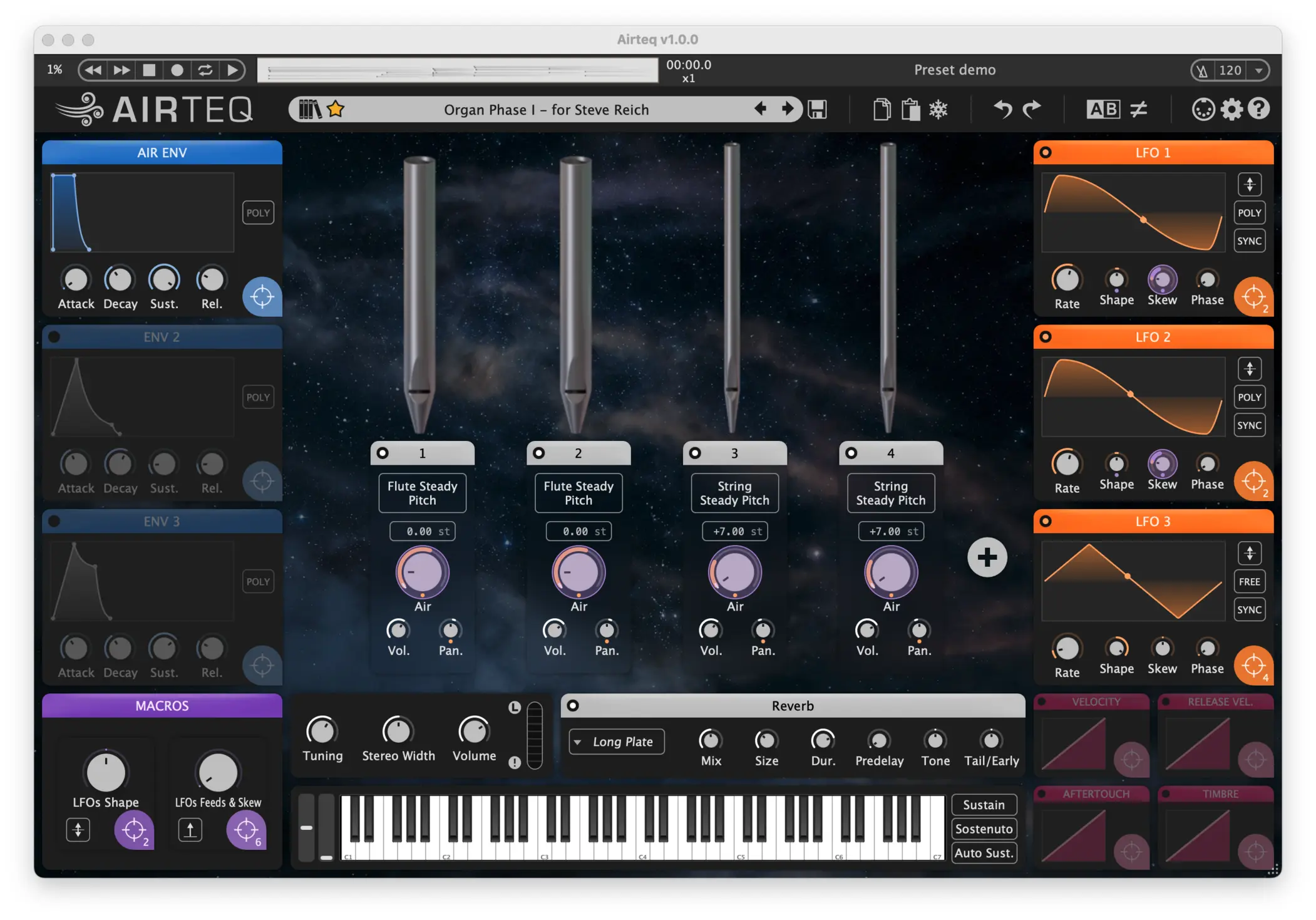
Each modulator type has its own color: blue for envelopes, purple for macros, orange for LFOs and pink for gestures. It helps distinguish modulation sources:
- for
direct modulation links, the outer circle and filled-in section of the modulated ring will both match the color of the source. - for
modulation via links, the outer circle matches the color of the source, and the filled-in section matches the destination.

All modulators can be identified by their target icon, located at the bottom-right of their panel.
6.1. Visual feedback
When a modulator controls one or more Airteq parameters, the number of active modulation links is displayed next to the target icon. Conversely, if a parameter is modulated, a small colored dot appears below it.
When hovering the target icon of a modulator, if it has any direct modulation links, their depths will be shown on the destination controls, in the modulators color.
If it has any modulation via links, their depths will be also shown, but in the color of the other modulator. For instance, hovering on the second Macro highlight here the 6 modulated parameters:
6.2. Direct modulation link
To create a direct modulation link, drag the target icon of a modulator.
While dragging, all modulatable parameters are highlighted.
Drop the icon onto the desired parameter to create the link.
The modulation is represented by a modulation ring that appears when hovering the modulated control.
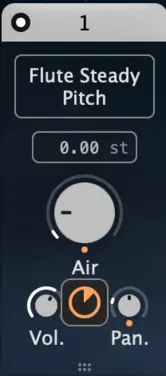
The modulation ring amount can be set between -1 and 1. A value of 0 means the modulator has no effect.
modulation rings are initialized with a default value of 0.25.
You can also create a direct modulation link by right-clicking the target icon, then pressing the + button to display the list of available targets.
6.3. Modulation via link
A modulation via allows a second modulator to control the depth of an existing modulation.
To create a modulation via link, drag the target icon of a modulator onto an existing modulation ring.
A secondary ring appears below the original one, with its outer color indicating the the modulator controlling the modulation depth.
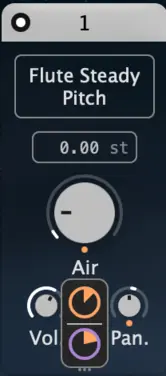
Modulation via can also be created by right-clicking the target icon, pressing the + button, and selecting one of the existing direct modulation links.
6.4. Modulation link removal
To remove a modulation link (direct or via):
- Hover over the modulated parameter and double-click the corresponding
modulation ring. - Right-click the target icon of the
modulator, then click the−button.
6.5. Main Air Envelope
The Main Air Envelope controls the overall Air supply of the instrument and acts as a global amplitude envelope, similar to a VCA envelope in traditional synthesizers.
As such, the Main Air Envelope has the four classical ADSR parameters:
Attacktime (ms)Decaytime (ms)Sustainvalue (in % of the targetted Air value).Releasetime (ms)This envelope directly affects all stops by modulating their Individual Air Gauges, defining how the sound evolves over time.
modulable, allowing dynamic and expressive control over the envelope shape.

The Main Air Envelope cannot be disabled and always operates in POLY mode: each played note is independently shaped by the envelope.
In addition, the Main Air Envelope can also be used as a standard modulator and assigned to other parameters within Airteq.
6.6. Envelopes
Airteq has two additional envelopes, with the classical ADSR parameters:
Attacktime (ms)Decaytime (ms)Sustainvalue (in % of the targetted Air value).Releasetime (ms)
An additional parameter Trigger let you chose the behaviour of the envelope:
Trigger: Switch between ENV trigger modes: LEGATO (trigger on first key pressed, and continues for each additional note played legato. Re-trigger otherwise.), MONO (trigger on last key), POLY (one trigger per key).
6.7. Low Frequency Oscillators (LFO)
Airteq comes with three Low Frequency Oscillators (LFO). On the right-hand side of each LFO shape are the following parameters:
Polarity: Switch between unipolar/bipolar modulation.Trigger: Switch between LFO trigger modes: FREE, LEGATO (trigger on first key pressed, and continues for each additional note played legato. Re-trigger otherwise.), MONO (trigger on last key), POLY (one trigger per key).Sync: Synchronizes the effect with the internal metronome (in Standalone) or with the host tempo (plug-in).
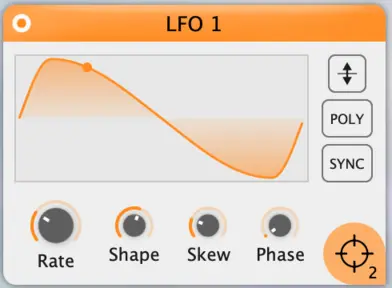
Four knobs at the bottom of each LFO panel let you tune the following:
Speed: Oscillation rate (Hz or bpm subdivision if theSyncmode is active).Shape: Oscillation shape, from square (-1), sine (0) to triangle (1).Skew: Skew tilts the LFO waveform in time. It shifts where the cycle spends more time (early vs late) without changing the overall rate.Phase: sets the starting point of the LFO waveform in its cycle (0 to 360°) at the moment the LFO is triggered.
6.8. Gesture Modulators

Gesture modulators allow you to control any sound parameter directly from your playing. Unlike LFOs or envelopes, they are not autonomous: they respond in real time to your gestures and to the way you interact with the keyboard or controller.
Four gesture sources are available:
- Note-on Velocity: the velocity of the key strike
- Note-off Velocity: the velocity at which the key is released
- Aftertouch: the pressure applied after the initial strike
- Timbre: an additional expressive dimension depending on the playing mode or controller used (for example the second pressure dimension on the Expressive-E Osmose keyboard)
MPE is enabled. In that case, each played note appears as a small dot on the response curves.
6.8.1. Response Curve

Each gesture modulator has an editable response curve that allows you to precisely adjust how the modulation reacts to your playing. A click in the editor creates a control point. Points can be dragged to change the shape of the curve. The curve defines how the incoming gesture value is transformed before being applied as modulation.
You can make the response more linear, more progressive, or concentrate the modulation within a specific range of the gesture. This system allows the instrument to be adapted both to your playing technique and to the controller you use, enabling very subtle expressive behaviors.
6.8.2. Aftertouch additional parameters
The Aftertouch gesture modulator responds to pressure applied after a note has been played. It provides two specific controls, accessible within the response curve editor:
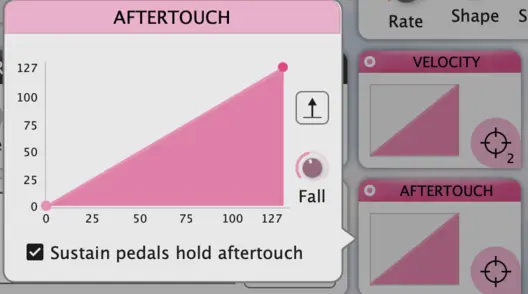
- Fall: the time (ms) required for the Aftertouch value to return to zero after the note is released. Short values produce an immediate drop, while longer values create a smoother, more gradual decay.
- Sustain pedals hold aftertouch: When enabled, pressing a sustain pedal prevents the Aftertouch value from falling after the note is released. The value is held until the sustain pedal is released, after which it returns to zero according to the Fall time.
6.9. Macros
A macro is a high-level control that allows you to adjust several sound parameters at once using a single knob.
Like every other Airteq modulator, each macro can be assigned to multiple targets across the instrument (such as Individual Air Gauges, LFO rate, or to create a modulation via on any existing modulation link). By moving one macro control, you can create coordinated changes that would otherwise require adjusting many parameters individually.
Macros are particularly useful for:
- shaping the overall character of a sound
- creating expressive performance controls
- simplifying complex modulation setups
- enabling smooth real-time sound transformations
They provide a fast and intuitive way to explore variations of a preset, design dynamic sound evolutions, or adapt the instrument response during live performance.
7. GUI MIDI Controls
7.1. Pitch Bend and Mod Wheel
The Pitch Bend wheel and Mod Wheel are located to the left of the virtual keyboard. Like the virtual keyboard itself, they generate MIDI messages:
- the Pitch Bend wheel sends
Pitch BendMIDImessages - the Mod Wheel sends
CC 1MIDImessages
By default, the pitch bend range is ±200 cents (±2 semitones). This range can be modified by editing the corresponding MIDI Mapping.
MIDI Mapping, CC 1 is assigned to Macro 1. As a result, the Mod Wheel directly controls Macro 1. This behavior can be changed by editing your own MIDI Mapping.
7.2. Sustain modes
Airteq offers three sustain modes that modify how notes are held after they are released, allowing different playing behaviors and performance techniques. These are particularly useful for cinematic and pads textures when one wants to modify in real-time the sound texture without having to hold the keys.
7.2.1. Sustain
Similar to the piano sustain pedal. Any note that is released while Sustain is active will continue to sound until the mode is turned off.

7.2.2. Sostenuto
Similar to the piano sostenuto pedal. Play and hold one or more notes, then activate Sostenuto mode. After you release the keys, only those notes will continue to sound for as long as Sostenuto remains active. Notes played afterwards behave normally.

7.2.3. Autosustain
Automatically holds a group of notes played within a short time interval, set by default at 1000 ms. It can be edited with a right-click on the Autosustain button.
Once this interval has passed, any newly played note starts a new sustained group and releases the previous one.

MIDI assignable to any MIDI event.
8. Reverberation
A convolution reverberation unit simulates acoustic surroundings ranging from Studio up to very long reverbs like Cathedral or Taj Mahal. It includes other types of reverbs such as Plate, Spring, Speakers, Broceliande... You can even load your own reverb impulses via Load WAV impulse in the reverb menu.
The reverberation is controlled by the following parameters:
Mix: the relative level in dB between reverberant sound and direct soundDuration: the length of the reverberant soundRoom size: from 5m to 50mPre-delay: the time between the direct sound and the reverberant soundTone: a tilt equalizer that only affects the reflected sound, darker to the left, brighter to the rightTail / Early reflections: the relative level in dB between early reflections and reverberation tail.
9. List of built-in presets
This section presents all the Airteq built-in presets. Each preset has one Soundtype, one or more tags. Each preset also includes a built-in mini-demo, which can be played from the preset manager or from the MIDI player (Standalone version only).
mini-demo recorded at 120 BPM. Set the current tempo to 120 BPM to hear them as intended.
| Preset Name | Description | Tags | Soundtype | Author |
| Init (Overblow) | A flute that produces aeolian sounds at low Air, and overblows at high Air. There is no reverb: what you hear is the dry sound of the pipe. Macro 1 is already linked to the flute Air gauge - play with it ! | Overblow | Natural Pipes | Modartt |
| Init (Glissando) | A flute whose pitch gently fluctuates with the Air. There is no reverb: what you hear is the dry sound of the pipe. Macro 1 is already linked to the flute Air gauge - play with it ! | Glissando | Natural Pipes | Modartt |
| Init (Steady Pitch) | A flute who stays in tune regardless of the Air, and whose timbre gets brighter. There is no reverb: what you hear is the dry sound of the pipe. Macro 1 is already linked to the flute Air gauge - play with it ! | Steady Pitch | Electronic Music | Modartt |
| Aeolian Generator - Low | An aeolian generator on the low end. Control the overall Air with Macro 1, and the crystalline character made by the LFO with Macro 2. | Evolving, Aeolian, Pad, Cinematic | Natural Pipes | Modartt |
| Aeolian Generator - Medium | An aeolian generator on the mid spectrum. Control the overall Air with Macro 1, and the crystalline character made by the LFO with Macro 2. | Evolving, Aeolian, Pad, Cinematic | Natural Pipes | Modartt |
| Aeolian Generator - High | An aeolian generator on the higher end of the spectrum. Control the overall Air with Macro 1, and the crystalline character made by the LFO with Macro 2. | Evolving, Aeolian, Pad, Cinematic | Natural Pipes | Modartt |
| Air Flow | Sequential lead with an airy texture and fluid movement, designed to add space and dynamism to a music production. Macro 1 adds a brighter tone, while Macro 2 controls the LFO speed. | BPM Sync, Rhythmic, Sequenced | Electronic Music | Cipryan Bot |
| Ambient Strings | A set of heavily modulated strings, sensitive to velocity. Play with the Macro 1 to drastically alter the overall timbre. | Cinematic, Overblow | Natural Pipes | Modartt |
| Ambient Strings - MPE | A set of heavily modulated strings, sensitive to velocity and aftertouch. Play with the Macro 1 to drastically alter the overall timbre. | MPE, Cinematic, Overblow | Natural Pipes | Modartt |
| Aria Flute I | A single flute whose Air dynamic is carefully crafted to emulate the natural vibrato of a singing voice. Macro 1 controls the vibrato rate, while Macro 2 adjusts the overall Air and volume. | Lead, Glissando | Natural Pipes | Modartt |
| Aria Flute II | A single flute whose Air dynamic is carefully crafted to emulate the natural vibrato of a singing voice. Macro 1 controls overall Air and volume, while Macro 2 adjusts the Vibrato. | Lead, Glissando | Natural Pipes | Modartt |
| Basic Overblow - MPE | A simple overblowing flute, sensitive to note on velocity and polyphonic aftertouch. | MPE, Overblow | Natural Pipes | Modartt |
| Basic Overblow - Breath | A simple overblowing flute, sensitive to note on velocity and polyphonic aftertouch. This variation of the 'Basic Overblow' preset was designed to be played with a Breath Controller. | Breath Controller, Overblow | Natural Pipes | Modartt |
| Beyond the Pyramids | An evolving, cinematic pad that evokes the grandeur of the Pyramids and the vastness of the desert. Let the Sirocco blows with Macro 1. | Cinematic, Evolving, Noisy, Reed | Cinematic Textures | Modartt |
| Beyond the Pyramids - Breath | A Breath Controller variant of the 'Beyond the Pyramids' preset. Expressive gestures such as blowing and bite are mapped to both Macros, providing natural control over the sound. | Breath Controller, Cinematic, Evolving, Noisy, Reed | Cinematic Textures | Modartt |
| Bloom Together | Two very different sound textures, one percussive and noisy, the other flutey and melodic, that gently melt together. Control their respective blooming with Macros 1 and 2. | Cinematic, BPM Sync, Percussive | Natural Pipes | Modartt |
| Bongos Beat | A rhythmic bongo sequence across different pitches creates a deep tribal atmosphere. Macro 1 adds a dusty, diffused reverb character, while Macro 2 adjusts the rhythm speed. | Percussive, Rhythmic, Sequenced, BPM Sync | Cinematic Textures | Cipryan Bot |
| Bourdon Generator | A set of five stopped pipes whose very slow attack and release generates nice overlapping overtones. Attack time is controlled by Macro 1 - cranking it to the max gives a decreasing soundscape. Macro 2 shape the bass amount and character. | Evolving, Pad, Overblow | Natural Pipes | Modartt |
| Bowed Ensemble | A synthetic bowed string ensemble with a raspy, expressive character, blending orchestral warmth with modern textures. Macro 1 introduces a metallic character, while Macro 2 controls the vibrato speed. | Cinematic, Soundscape, Strings | Cinematic Textures | Cipryan Bot |
| Brass Gang Minor | A biting reed ensemble playing minor chords, that keeps you on your toes. | Chords, Reed, Keys | Natural Pipes | Modartt |
| Bravo le LFO | A soft and flutey set of pipes, with some synchronous LFO giving an inner rhythm. It works very well with the Auto Sustain mode. Play with the Macro 1 to increase the overall brightness. | BPM Sync, Cinematic | Natural Pipes | Modartt |
| Bravo le LFO - Macro Play | A soft and flutey set of pipes, with some synchronous LFO giving an inner rhythm. It works very well with the Auto Sustain mode. Macro 1 controls the overall Air, while Macro 2 sets the LFO shapes. | BPM Sync, Cinematic | Natural Pipes | Modartt |
| Brocade | A set of velocity sensitive pipes, evocative of medieval wind ensemble. Adjust the relative presence of High and Low pipes with Macros 1 and 2. | Organ, Overblow | Natural Pipes | Modartt |
| Broken Stopped (and Friends) | The broken stop produces percussive mouth noises, while the other pipes create a gentle background. Macro 1 controls the attack amount, while Macro 2 activates/deactivates the repeated attacks. | BPM Sync, Percussive | Natural Pipes | Modartt |
| Burning Bush | A warm, evolving pad with subtle harmonic movement, shimmering highs, and a slow, pulsing low end. Macro 1 controls the overall Air and LFO-induced shimmer. | Pad | Cinematic Textures | Modartt |
| Burning Bush - Breath | A Breath Controller variant of the 'Burning Bush' preset. Expressive gestures such as blowing and tilt are mapped to both Macros, providing rich control over the sound. | Breath Controller, Pad | Cinematic Textures | Modartt |
| Canyon | A dynamic bass sequence featuring layered low and midrange plucks, delivering a driving groove for electronic music. Macro 1 increases the mid-bass level, while Macro 2 adjusts the sequence speed. | Bass, BPM Sync, Cinematic, Sequenced, Rhythmic, Mixtura | Electronic Music | Cipryan Bot |
| Celeste Drift | Three gently detuned pipes create a soft, celeste-like beating. Macro 1 brings them closer together—though never quite perfectly in tune. Velocity shapes the attack and balance, while release velocity controls the tail. | Glissando, Pad, Release sensitive | Natural Pipes | Modartt |
| Chassé-Croisé (Overblow) | Five overblowing flutes whose Air supply evolve in time - some increasing, some decreasing, resulting in nice natural chorus effects. Play with Macro 1 and 2 to adjust the Air and LFO amount in real-time. Some pipes might even overblow! | Overblow, Pad | Natural Pipes | Modartt |
| Chassé-Croisé (Glissando) | Five flutes whose Air supply evolve in time - some increasing, some decreasing, resulting in nice natural chorus effects. Play with Macro 1 and 2 to adjust the Air and LFO amount in real-time. | Glissando, Pad | Natural Pipes | Modartt |
| Chiff me | The amount of mouth noises ('chiff') are sensitive to the velocity. They can also be controlled by Macro 1. | Percussive | Natural Pipes | Modartt |
| Chiff me more | The amount of mouth noises ('chiff') are VERY sensitive to the velocity. They can also be controlled by Macro 1. | Percussive | Natural Pipes | Modartt |
| Chirping Birds | Small nestlings, full of life and energy. Both macros subtly change their vivacity. | Percussive, Cinematic, Overblow | Cinematic Textures | Modartt |
| Classical Flute | A classic concert flute with a subtle vibrato. Velocity controls the attack. Macro 1 enhances the brightness, while Macro 2 adjusts the vibrato speed. | Cinematic, Overblow, Lead | Natural Pipes | Cipryan Bot |
| Conquest | A lush cinematic string ensemble featuring a slow attack and expansive orchestral character. Macro 1 adjusts the attack, while Macro 2 controls the tonal character. | Cinematic, Soundscape, Strings | Electronic Music | Cipryan Bot |
| Crescendo Strings - MPE | A set of heavily modded strings that is sensitive to press and release velocity, polyphonic aftertouch and pressure. Play with Macro 1 to alter dramatically the timbre and character. | MPE, Cinematic, Steady Pitch, Strings | Cinematic Textures | Modartt |
| Crescendo Strings - Breath | A Breath Controller variant of the 'Crescendo Strings' preset. Expressive gestures such as blowing, tilt and nod are mapped to both Macros and Aftertouch, providing rich control over the sound. | Breath Controller, Cinematic, Steady Pitch, Strings | Cinematic Textures | Modartt |
| Dancing Ensemble | A bouncing set of tuned pipes that can be used for a wobbly bass, or playing rhythmic chords. Macro 1 adds some dirt and wobbliness, while Macro 2 controls the high strings presence. | BPM Sync, Bass, Steady Pitch | Electronic Music | Modartt |
| Deep Jungle | An immersive atmospheric preset that recreates the soundscape of a dense tropical jungle. Macro 1 blends in a continuous drone, while Macro 2 controls the frequency of the ambient sound events. | Cinematic, Overblow, Soundscape | Cinematic Textures | Cipryan Bot |
| Dirt me that bass | A set of low bass pipes which is sensitive to velocity. Macro 1 adds a lot of dirt. | Bass, BPM Sync, Steady Pitch | Electronic Music | Modartt |
| Doppelganger - MPE | A strange and enigmatic tone that you can probably hear in the deepest German woods described by the Grimm's brothers. Adjust Flutter and Tone with both Macros, and alter LFOs and some stops volume with Aftertouch and Timbre. | MPE, Cinematic, Pad, Evolving | Cinematic Textures | Modartt |
| Doppelganger - Breath | A Breath Controller variant of the 'Doppelganger' preset. Expressive gestures such as blowing, tilt, nod and bite are mapped to both Macros, Aftertouch and Timbre, providing rich control over the sound. | Breath Controller, Cinematic, Pad, Evolving | Cinematic Textures | Modartt |
| Echoes from ancient time | A slow decay that controls the LFO amount feeding these steady pitched pipes. | BPM Sync, Cinematic, Steady Pitch | Natural Pipes | Modartt |
| Echoes from ancient time - Overblow | A slow decay that controls the LFO amount feeding these overblowing pipes. | BPM Sync, Cinematic, Overblow | Natural Pipes | Modartt |
| Eclipse | A bright soundscape that swells and recedes like the shadow of a celestial event. | BPM Sync, Evolving, Bright | Electronic Music | Modartt |
| Ember Veins | Glowing, molten textures that shift and pulse like lava flowing beneath the earth’s crust. Control the flow speed with Macro 1. | Keys, Pad | Electronic Music | Modartt |
| Empty Murmur - Breath | Designed for keyboard and Breath Controller performance. Breath acts as the air source of the pipes, while expressive gestures such as Aftertouch, bite, nod and tilt can control vibrato and brightness for detailed modulation of the sound. | Breath Controller, Keys, Pad | Natural Pipes | Modartt |
| Empty Murmur - Wind | Designed specifically for Wind Controller performance. Breath acts as the air source of the pipes, while expressive gestures such as Aftertouch, bite, nod and tilt can control vibrato and brightness for detailed modulation of the sound. | Wind Controller, Keys, Pad | Natural Pipes | Modartt |
| Erratic Pulse | A glitchy keys patch with unpredictable modulation. | Keys, Glitch, Pad | Electronic Music | Modartt |
| Flute Generator - Low | A flute generator that starts with aeolian sounds, and might overblow if you play too much with the Macro 1. This generator fills the low end of the spectrum. | Evolving, Pad, Overblow, Aeolian, BPM Sync | Natural Pipes | Modartt |
| Flute Generator - Medium | A flute generator that starts with aeolian sounds, and might overblow if you play too much with the Macro 1. This generator fills the mid spectrum. | Evolving, Pad, Overblow, Aeolian, BPM Sync | Natural Pipes | Modartt |
| Flute Generator - High | A flute generator that starts with aeolian sounds, and might overblow if you play too much with the Macro 1. This generator fills the higher end of the spectrum. | Evolving, Pad, Overblow, Aeolian, BPM Sync | Natural Pipes | Modartt |
| Flute Plucks | Short flute plucks, in which the amount of Air is tied to the velocity. Macro 1 increases the decay duration. | Percussive, Steady Pitch | Natural Pipes | Modartt |
| Fluttering Horizons | Cinematic flute sound featuring an evolving flutter articulation creating a natural motion transition. Macro 1 adds high-pitched fluttering tones, while Macro 2 adjusts the fluttering rate. | Overblow, Aeolian, Evolving, Mixtura, Cinematic | Cinematic Textures | Cipryan Bot |
| Foehn - Breath | Designed for keyboard and Breath Controller performance. Breath acts as the air source of the pipes, while expressive gestures such as Aftertouch, bite, nod and tilt can control vibrato and brightness for detailed modulation of the sound. | Breath Controller, Glissando, Lead | Natural Pipes | Modartt |
| Foehn - Wind | Designed specifically for Wind Controller performance. Breath acts as the air source of the pipes, while expressive gestures such as Aftertouch, bite, nod and tilt can control vibrato and brightness for detailed modulation of the sound. | Wind Controller, Glissando, Lead | Natural Pipes | Modartt |
| Forbidden Citadel | This remote place stands atop an immense mountain in a cold and lightless waste... Could it be Kadath? Explore every corner with both Macros. | Evolving, Noisy, Cinematic, Bass | Cinematic Textures | Modartt |
| Frozen Time | A simple pad preset using a flute, a mixtura, and a couple LFOs. Adjust the shimmer speed with Macro 1. | Pad, Mixtura, Steady Pitch | Cinematic Textures | Modartt |
| Gentle overblow lead - MPE | Control each overblowing pipe using polyphonic aftertouch and pressure. Macro 1 controls some Air supplies and LFO parameters, while Macro 2 impacts all the LFOs rates. | MPE, Overblow, Lead | Natural Pipes | Modartt |
| Gimme some Dry Air | A turbulent Bourdon generator centered on low Air pressures, in a dry environment. Macro 1 controls the attack duration, while Macro 2 controls the global Air. Note on Velocity controls the envelope amount fed to the pipes. | Cinematic, Noisy | Natural Pipes | Modartt |
| Gimme some Wet Air | A turbulent Bourdon generator centered on low Air pressures. Macro 1 controls the attack duration, while Macro 2 controls the global Air. | Cinematic, Noisy | Natural Pipes | Modartt |
| Glass Harmonica | Five natural flutes whose Air values are precisely set where aeolian sounds can be heard. Macro 1 transports you to the edge of the aeolian regime, while Macro 2 adds instabilities. | Aeolian, Bright, Evolving | Natural Pipes | Modartt |
| Glass Resonance | Resonant glass tones with a long, flowing sustain and a subtle filter movement. Velocity controls the attack, while Macro 1 adjusts the resonant sustain and Macro 2 controls the modulation speed. | Cinematic, Soundscape, Noisy, Bright, Percussive | Natural Pipes | Cipryan Bot |
| Grimoire | A mystical, arcane, swirling, detuned patch. It features phasing between the two main pipes... Macro 1 channels swirls and adds chaos. | Cinematic, Pad, Stereo effect | Natural Pipes | Modartt |
| Gritty pad - MPE | A set of pipes whose pitch is stable regardless of the Air, sensitive to press, polyphonic aftertouch and pressure. Play with Macro 1 to add grittiness to the overall character. | MPE, Steady Pitch, Cinematic, Evolving | Cinematic Textures | Modartt |
| Gritty pad - Breath | A Breath Controller variant of the 'Gritty Pad' preset. Expressive gestures such as blowing, tilt, bite and nod are mapped to Aftertouch, Timbre and both Macros, providing rich control over the sound. | Breath Controller, Steady Pitch, Cinematic, Evolving | Cinematic Textures | Modartt |
| Haunted House | An abandoned mansion, full of crackles, creaks and strange noises. Turn up Macro 1 and you might even hear a few spooky woo-hoos... | Keys, Overblow, Cinematic, Noisy | Cinematic Textures | Modartt |
| Happy Pipes | These pipes are full of joy, and their happiness can increase with Macro 1. Macro 2 controls the balance between several layers, between relative dullness and extreme expansivity. | Keys, Bright, Percussive, Steady Pitch | Electronic Music | Modartt |
| Herald of the Air | Starting not so far from the Duduk of Arrakis, which can be sculpted using the Breath Macro, you can drift toward alien sounds pushing the Stellar Macro. | Noisy, Cinematic, Steady Pitch | Natural Pipes | Modartt |
| Home Run | Velocity controls some Air gauges and LFO amounts. Macro 1 controls the presence of the bright Mixtura, and some grittiness as well. Increase it to celebrate a home run from your favorite team! | Steady Pitch, Mixtura, Organ | Natural Pipes | Modartt |
| Huge Space - MPE | A set of pipes in a huge room. First aftertouch controls some Air gauges and LFO feeds, while second aftertouch makes the mixtura appears and the other pipes vanishes into thin Air. | MPE, Steady Pitch, Pad, Mixtura | Cinematic Textures | Modartt |
| Huge Space - Breath | A Breath Controller variant of the 'Huge Space' preset. Expressive gestures such as blowing, tilt, bite and nod are mapped to both Macros and Aftertouch, providing rich control over the sound. | Breath Controller, Steady Pitch, Pad, Mixtura | Cinematic Textures | Modartt |
| Ikaros | Icarus’s flight toward the sun. One Macro creates the sensation of wings moving through the Air at different speeds, while the other conveys the increasing heat of the sun. | Mixtura, Cinematic, Evolving | Natural Pipes | Modartt |
| Jericho Horns | A towering, ancient and bass heavy call of war. Macro 1 brings in the flutes, while Macro 2 adds the reeds and horns for a fuller, more forceful sound. | Cinematic, Reed, Bass | Natural Pipes | Modartt |
| Laser Beam | Vibrant arpeggiated sequence inspired by classic analog synthesis that combines vintage warmth with modern electronic textures. Macro 1 remove the bass, while Macro 2 sets the arpeggiator speed. | BPM Sync, Rhythmic, Sequenced, Bright | Electronic Music | Cipryan Bot |
| Legato Envelope | These long envelopes continuously change the timbre - as long as you play Legato! You can counter the envelope influence with Macro 1, and add some wobbliness with Macro 2. | Pad, Evolving, Steady Pitch | Electronic Music | Modartt |
| Leslie I | Oscillating the Air supply of organ pipes is surprisingly reminiscent of a Leslie cabinet. Adjust the LFO amount with Macro 1, and deviates from the nominal Air with Macro 2. | Overblow, Electric Organ | Natural Pipes | Modartt |
| Leslie II | Another Leslie cabinet with organ pipes, but grittier and with more stops. Adjust the LFO amount with Macro 1, and deviates from the nominal Air with Macro 2. | Overblow, Electric Organ | Natural Pipes | Modartt |
| Leviathan Pulse - Static | A deep swell that mimics the movement of a colossal creature beneath the waves. Control the beast speed and strength with Macro 1. | Cinematic, BPM Sync | Cinematic Textures | Modartt |
| Leviathan Pulse - Dynamic | A deep swell that mimics the movement of a colossal creature beneath the waves. Control the beast speed and strength with Macro 1, but also its dangerousness with the note on velocity. | Cinematic, BPM Sync | Cinematic Textures | Modartt |
| Lively Mixtura | The pitch of this responsive mixtura is stable with the Air. Macro 1 control its Air, while Macro 2 increases the LFO amount. | Steady Pitch, Mixtura | Natural Pipes | Modartt |
| Lively Mixtura - MPE | The pitch of this responsive mixtura is stable with the Air. Macro 1 control its Air, while Macro 2 increases the LFO amount. MPE pressure and aftertouch controls each pipe Air supply. | Steady Pitch, Mixtura, MPE | Natural Pipes | Modartt |
| Lively Keys | This set of glissandi flutes is responsive to your playing. | Glissando, Keys | Natural Pipes | Modartt |
| Lively Keys - LFO | This set of steady pitch flue pipes is responsive to your playing. Control the amount of Air fed by the LFO with Macro 1. | Steady Pitch, Keys | Natural Pipes | Modartt |
| Lively Keys - ENV | This set of steady pitch flue pipes is responsive to your playing. Macro 1 controls some Air gauges. | Steady Pitch, Keys | Natural Pipes | Modartt |
| Make a mouth noise here | Play with the macro to change the attack of this broken stop! | Percussive | Natural Pipes | Modartt |
| Meddling Tides | A complex textured pad whose sound starts low and noisy. Use both Macros to elevate dramatically its complexity. | Pad, Evolving, Cinematic, Mixtura | Cinematic Textures | Modartt |
| Meddling Tides - MPE | A complex textured pad whose sound starts low and noisy, adapted for MPE controllers. Use Polyphonic Aftertouch, Timbre and Macros to elevate dramatically its complexity. | Pad, Evolving, MPE, Cinematic, Mixtura | Cinematic Textures | Modartt |
| Minimal Pad | A minimal pad preset using a single flute, a couple LFOs and a simple envelope. Complexify its character with Macro 1. | Pad, Cinematic, Evolving | Electronic Music | Modartt |
| Minimal Pad - Hollow | A minimal pad preset using a single stopped flute, a couple LFOs and a simple envelope. Complexify its character with Macro 1. | Pad, Cinematic, Evolving | Electronic Music | Modartt |
| Monolith | A mysterious, distant drone that stands like an ancient monument, using subtle modulation to create a sense of timelessness and grandeur. | Pad, Cinematic, Evolving | Electronic Music | Modartt |
| Nearly on Rhythm | One could almost detect some semblance of rhythm in this peculiar montage. Add some wobbliness with Macro 1, and release the glitchy mixturas with Macro 2. | BPM Sync, Glitch | Electronic Music | Modartt |
| Nearly on Rythm - Glitchier | One could almost detect some semblance of rhythm in this montage. Makes it definitely unintelligible with Macro 1, and release the glitchy mixturas with Macro 2. | BPM Sync, Glitch | Electronic Music | Modartt |
| Necromancer's Chant | A deep, dissonant bass with wobbling modulation. Enough to send chills down the spine of the undead! Macro 1 controls the overall Air. | Glitch | Electronic Music | Modartt |
| New Dawn | A spacious and aspirational sequenced sound with an uplifting and atmospheric character. Macro 1 adjusts the Skew parameter, while Macro 2 controls the LFO rate. | BPM Sync, Rhythmic, Sequenced, Mixtura | Electronic Music | Cipryan Bot |
| Octaving Keys | This overblowing flute is sensitive to your playing. Hitting hard a note might produce an octaviation! | Overblow, Keys | Natural Pipes | Modartt |
| Old Barrel Organ | An old detuned barrel organ. Further alter its condition with Macro 1. | Overblow, Keys, Organ | Natural Pipes | Modartt |
| On a Thin Line | A low stopped pipe gives a comforting bass. Meanwhile, one flute dangerously flirts with low aeolian sounds and the other really wants to overblow. Control the recklessness of that flute with Macro 1. | Overblow, Aeolian | Cinematic Textures | Modartt |
| On a Thinner Line | A low stopped pipe gives a comforting bass. Meanwhile, one flute dangerously flirts with low aeolian sounds and the other really wants to overblow. Control the recklessness of that flute with Macro 1. | Overblow, Aeolian, Percussive | Cinematic Textures | Modartt |
| Oracle's Vision | A crystalline sound modulated with a combination of quarter notes and dotted eighth notes, perfect for rhythmic accompaniment playing arpeggiated chords. Macro 1 controls the overall Air. | BPM Sync, Keys, Mixtura | Electronic Music | Modartt |
| Organ Phase I - for Steve Reich | A tribute to minimal music composer Steve Reich, made of two pair of identical pipes slightly out of synchronisation, while a slow free-running LFO controls the stereo image. Wait a few seconds to hear that great 'phasing' effect, and adjust the shape, skew and LFO amount with Macros 1 and 2. If needed, deactivate LFO 3 to get rid of the stereo effect. | Steady Pitch, Stereo effect, Phase music, Sequenced | Natural Pipes | Modartt |
| Organ Phase II - for Steve Reich | A tribute to minimal music composer Steve Reich, made of two pair of identical pipes slightly out of LFO synchronisation and a gentle evolving stereo effect. All the pipes stay in the low Air regime. Sculpt your sound by adjusting the LFO amount with Macro 1. Macro 2 controls the Air gauges, ranging from the noise at low values to almost harmonic sound at high values. You might also pass through aeolians sounds! | Steady Pitch, Stereo effect, Phase music, Sequenced | Natural Pipes | Modartt |
| Organ Phase III - for Steve Reich | A tribute to minimal music composer Steve Reich, made of two pair of identical pipes slightly out of LFO synchronisation. Adjust the phasing ambitus with Macro 1, and both rates with Macro 2. | Steady Pitch, Stereo effect, Phase music, Sequenced | Natural Pipes | Modartt |
| Organ Phase IV - for Steve Reich | A tribute to minimal music composer Steve Reich, made of two pair of identical pipes slightly out of LFO synchronisation. All the pipes of this preset stay tuned, regardless of the Air! Wait a few seconds to hear that great 'phasing' effect, and adjust the phase and skew with Macros 1 and 2. | Steady Pitch, Stereo effect, Phase music, Sequenced | Natural Pipes | Modartt |
| Ouverture de Feerie - MPE | Play it like Ravel. | MPE, Steady Pitch, Chords | Natural Pipes | Modartt |
| Overblow Strings I - MPE | A set of heavily modded overblowing strings that is sensitive to press and release velocity, polyphonic aftertouch and pressure. Play with Macro 1 to alter dramatically the timbre and character. | MPE, Cinematic, Overblow, Strings | Natural Pipes | Modartt |
| Overblow Strings II - MPE | A set of heavily modded overblowing strings that is sensitive to press velocity, polyphonic aftertouch and pressure. Play with Macro 1 to alter dramatically the timbre and character. | MPE, Cinematic, Overblow, Strings | Natural Pipes | Modartt |
| Paladin's Oath | A bright, brass-like ensemble with a rich, harmonic structure, fit for a knight’s triumphant march. Macro 1 adds gently some Air and LFO effects. | Bright, Reed | Natural Pipes | Modartt |
| Peruvian Flute | Directly imported from the Cordilleras. | Percussive, Noisy | Natural Pipes | Modartt |
| Pillar of Salt | Don't turn back on this soft, bright stereo patch with a nostalgic quality. Macro 1 adds shimmer with some Air and LFO parameters. | Bright, Stereo effect, Pad, Evolving, Mixtura | Cinematic Textures | Modartt |
| Pillar of Salt - Breath | A Breath Controller variant of the 'Pillar of Salt' preset. Expressive gestures such as blowing, tilt, bite and nod are mapped to Aftertouch and both Macros, providing rich control over the sound. | Breath Controller, Bright, Stereo effect, Pad, Evolving, Mixtura | Cinematic Textures | Modartt |
| Plastic Groove | A rhythmic percussion sequence featuring synthetic plastic-like tones and a distinctive reverberant ambience. Macro 1 introduces a bright, continuous tone, while Macro 2 adjusts the percussion sequence speed. | Percussive, Rhythmic, Sequenced, BPM Sync | Electronic Music | Cipryan Bot |
| Polyphase | A layered Lead sound with evolving timbre and three free-running LFOs. Macro 1 controls the Air of the flue pipes, while Macro 2 controls the Reeds - careful with the Reed detuning, though ... | BPM Sync, Bright, Steady Pitch, Lead, Evolving | Electronic Music | Modartt |
| Pulsating Pad | A slowly evolving pad with a gentle inner rhythm. The longer you sustain a note, the denser it gets. | Pad, Evolving | Electronic Music | Modartt |
| Pumping Release - Steady Pitch | The harder the release, the harder the Air! All the pipes have a stable pitch, here. Control the release time with Macro 1. | Steady Pitch, Release sensitive | Natural Pipes | Modartt |
| Pumping Release - Overblow | The harder the release, the harder the Air! It might overblow, tough... Control the release time with Macro 1. | Overblow, Release sensitive | Natural Pipes | Modartt |
| Quick-tempered Strings - MPE | These strings are very quick to overblow if you pressed the note too hard. Macro 1 controls their Air supply and, consequently, their chance of overblow. | Strings, Overblow, MPE | Natural Pipes | Modartt |
| Radiant Pad | A bright pad reminiscent of sunny mornings in the spring. Control the overall brightness with Macro 1. | Pad | Electronic Music | Modartt |
| Rain Drops | A rain atmosphere capturing the intimate sound of clean, nearby raindrops blended with a distant rainfall background. Macro 1 adds resonance to the raindrops, while Macro 2 removes the close-up raindrop sound. | Cinematic, Sequenced, Soundscape | Cinematic Textures | Cipryan Bot |
| Reed Generator | A gentle Oboe Reed generator that follows a long increasing and decreasing envelope. Soften the LFO Attacks with Macro 1. | Evolving, Cinematic, Reed | Cinematic Textures | Modartt |
| Reed of West | Two slightly detuned reeds evoke a gritty, harmonica-like tone, with a nod to a certain harmonica-playing stranger from the West. Velocity controls intensity, Macro 1 adds grit, and Macro 2 introduces a steady BPM-synced bumpiness. | Reed, Lead, Keys | Natural Pipes | Modartt |
| Reed of West - MPE | Two slightly detuned reeds evoke a gritty, harmonica-like tone, with a nod to a certain harmonica-playing stranger from the West. Aftertouch controls intensity, Timbre adds grit, and Macro 1 introduces a steady BPM-synced bumpiness. | MPE, Reed, Lead, Keys | Natural Pipes | Modartt |
| Rising Motion | A cinematic bass texture with lfo movement, shifting from slow to fast modulation and back again. Macro 1 controls the LFO speed, while Macro 2 removes the noise layer. | Cinematic, Mixtura, Bass | Cinematic Textures | Cipryan Bot |
| R'lyeh | A sunken city lost for millennia. Tweak the macros to awaken the mysteries slumbering in the depths, dreaming and awaiting… | Cinematic, Evolving, Overblow, Soundscape | Cinematic Textures | Modartt |
| Root Network | Organic, intertwining textures that grow and spread like the hidden roots of an ancient forest. Macro 1 controls some stops volume, airs and LFO rate. | Keys | Cinematic Textures | Modartt |
| Ruined Flute | The Air supply of this flute is broken... A lot of Air noise and aeolians sounds at first glance, but cranking Macro 1 to the max makes it almost playable! Macro 2 has a tendency to make it overblow, though... | Overblow | Natural Pipes | Modartt |
| Rusty Pad - MPE | Three flutes, one string and one reed, slightly detuned altogether. Modify some stops and volume with AfterTouch and Timbre, and add some meowing with Macro 2. | Evolving, Overblow, Cinematic, MPE | Cinematic Textures | Modartt |
| Rusty Pad - Breath | A Breath Controller variant of the 'Rusty Pad' preset. Expressive gestures such as blowing, tilt, bite and nod are mapped to Aftertouch, Timbre and both Macros, providing rich control over the sound. | Breath Controller, Evolving, Overblow, Cinematic | Cinematic Textures | Modartt |
| Sakuhachi Vibe | A specific articulation of the Japanese Shakuhachi flute. Macro 1 opens up the flute, while Macro 2 adjusts the vibrato rate, and the Velocity module controls the attack. Release velocity controls the intensity of the final articulation. | Cinematic, Sequenced, Release sensitive | Natural Pipes | Cipryan Bot |
| Scotland: Bad Tropes | A deliberately overcooked pile of bagpipe clichés, mocking the tired tropes so often imposed on Scotland and its lovely people. Macro 1 introduces the Bagpipes trope, while Macro 2 adjusts the supposed drunkenness. | Reed, Keys, Glissando | Natural Pipes | Modartt |
| Sea Shore | A layered seashore environment combining the rolling wave textures, seagull sounds, and a distant vessel atmosphere controlled by velocity. Macro 1 removes the seagull layer, while Macro 2 adjusts the frequency of the seagull sounds. | Cinematic, Soundscape, Sequenced | Cinematic Textures | Cipryan Bot |
| Self Evolving Drone - Static | A deep and textured evolving drone whose textura moves along a slow free-running LFO, controlling every pipe simultaneously. Macro 1 controls some Air gauges, while Macro 2 changes the relative amount of LFO modulation feeding each stop. Increasing it creates beautiful emphasis effects. | BPM Sync, Drone, Pad, Evolving | Cinematic Textures | Modartt |
| Self Evolving Drone - Dynamic | A deep and textured evolving drone whose textura moves along a slow free-running LFO, controlling every pipe simultaneously. The harder you hit a note, the bigger the texture. Macro 1 controls some Air gauges, while Macro 2 changes the relative amount of LFO modulation feeding each stop. Increasing it creates beautiful emphasis effects. | BPM Sync, Drone, Pad, Evolving | Cinematic Textures | Modartt |
| Self Evolving Drone - Poly | A deep and textured evolving drone. Each pipe evolves independently, following its own envelope(s). Macro 1 controls some Air gauges, while Macro 2 changes the relative amount of LFO modulation feeding each stop. Increasing it creates beautiful emphasis effects. | BPM Sync, Drone, Pad, Evolving | Cinematic Textures | Modartt |
| Sensitive Flutes - MPE | This ensemble of flutes are sensitive to the velocity and the aftertouch. You can control the general Air with Macro 1. | MPE, Glissando | Natural Pipes | Modartt |
| Sensitive Regal - MPE | Among these 5 pipes, only the reeds Regal are sensitive to the velocity and aftertouch. You can control the general Air with Macro 1. | MPE, Reed, Overblow | Natural Pipes | Modartt |
| Sequence me | Play some arpeggios and sustain them, then adjust Macro 1 to alter the LFO settings. | BPM Sync, Evolving | Electronic Music | Modartt |
| Sequence me - MPE | Play some arpeggios and sustain them. Macro 1 controls some Air gauges, while Macro 2 alters the LFO settings and overall timbre. Polyphonic pressure and aftertouch let you control the timbre of each note to gain maximal expressivity. | BPM Sync, MPE, Evolving | Electronic Music | Modartt |
| Sequence me - Breath | A Breath Controller variant of the 'Sequence me' preset. Expressive gestures such as blowing, tilt, bite and nod are mapped to Aftertouch, Timbre and both Macros, providing rich control over the sound. | Breath Controller, BPM Sync, Evolving | Electronic Music | Modartt |
| Shall I leave silently? | This flute is sensitive to your playing, both at press and release. | Overblow, Release sensitive | Natural Pipes | Modartt |
| Shall we leave silently? | This set of pipe is sensitive to your playing, both at press and release. | Overblow, Release sensitive | Natural Pipes | Modartt |
| Sharp Plucks | A pluck tone enhanced by rhythmic delay and a compact reverb space designed for modern electronic productions. Macro 1 opens up the pluck sound, while Macro 2 adjusts the delay effect speed. | BPM Sync, Keys, Percussive | Electronic Music | Cipryan Bot |
| Shimmer Haze | A clean and transparent key sound featuring an airy layer, wide tonal presence, and evolving frequency modulation. Macro 1 introduces a high-pitched tone, while Macro 2 adjusts the modulation speed. | Bright, Keys, Lead | Electronic Music | Cipryan Bot |
| Shine on crazy pad I - MPE | A set of heavily modded flue pipes that is sensitive to press, polyphonic aftertouch and pressure. Play with Macro 1 to alter dramatically the timbre and character. | MPE, Cinematic, Pad, Overblow, Steady Pitch | Cinematic Textures | Modartt |
| Shine on crazy pad II - MPE | A set of heavily modded flue pipes that is sensitive to press, polyphonic aftertouch and pressure. Play with Macro 1 to alter dramatically the timbre and character. | MPE, Cinematic, Pad, Overblow, Steady Pitch | Cinematic Textures | Modartt |
| Soundscape I | A soundscape that dangerously flirts with overblowing pipes. Macro 1 controls some Air gauges, while Macro 2 affects some LFO parameters. | Cinematic, Overblow, Reed, Soundscape | Cinematic Textures | Modartt |
| Soundscape II | A long soundscape that fills the space. Sometimes, you can hear aeolian sounds at low Air values. Macro 1 affects gently some Air gauges, while Macro 2 increases the presence of low frequency pipes. | Cinematic, Overblow, Aeolian, Soundscape | Cinematic Textures | Modartt |
| Soundscape III | A soundscape mainly made of high pitched overblowing pipes. Macro 1 controls some Air gauges, while Macro 2 affects the amount of LFO feeding some pipes. Try to crank it to its maximum! | Cinematic, BPM Sync, Overblow, Soundscape | Cinematic Textures | Modartt |
| Soundscape IV | A long soundscape that fills the space. Sometimes, you can hear aeolian sounds when the Air stops. Macro 1 affects some Air gauges up to overblow, while Macro 2 affects the amount of LFO feeding some pipes. | Cinematic, Overblow, Aeolian, BPM Sync, Mixtura, Soundscape | Cinematic Textures | Modartt |
| Soundscape V | A soundscape whose grittiness comes from some reed pipes. Grittiness is controlled by velocity, while Macros 1 and 2 plays on some Air gauges and LFO amounts. | Cinematic, Overblow, Reed, Soundscape | Cinematic Textures | Modartt |
| Soundscape - Stable | A soundscape whose pitch stays tuned. Macro 1 changes the overall timbre, while Macro 2 activates a low and noisy 24' stopped pipe. | Cinematic, Steady Pitch, Soundscape | Cinematic Textures | Modartt |
| Stopped Soundscape | A long soundscape, exclusively made of stopped pipes. Macro 1 controls the LFO amount that feeds some pipes, while Macro 2 controls its rate. | Cinematic, Overblow, Soundscape | Cinematic Textures | Modartt |
| Stopped Soundscape - Legato | A gentle variant of the Stopped Soundscape driven by a Legato envelope, with less LFO and a restricted Air range. | Cinematic, Overblow, Soundscape | Cinematic Textures | Modartt |
| Stone Whisper | The whispering sound of the Air in a cold, stony mountain. | Pad | Cinematic Textures | Modartt |
| Stormcaller | A brooding, cinematic atmosphere charged with tension. | Cinematic | Cinematic Textures | Modartt |
| SuperRegal | The bright sound of Regal stops with slight detuning, inspired by the classic SuperSaw patch of vintage synthesizers. | Bright, Lead, Reed | Natural Pipes | Modartt |
| The First Stone | A dark textured bass with ominous dissonance. Alter the overall texture with Macro 1. | Bass | Cinematic Textures | Modartt |
| The Organist’s Shortcut | Tired of playing relentless triplets? Does emphasizing the first beat hurt your wrist? These macros are made for you. | Sequenced, Bass, Reed, Organ | Natural Pipes | Modartt |
| Tidal Breath | A slow, undulating swell that mimics the ebb and flow of the ocean. | Pad | Cinematic Textures | Modartt |
| Trancemission | Layered airy lead and bass sequences with dynamic rhythmic modulation, creating motion and energy, perfect for trance sounds. Macro 1 adds a vocal-style chop layer, while Macro 2 cuts the percussion sound and Velocity sets the LFO rate. | BPM Sync, Rhythmic, Sequenced, Lead | Electronic Music | Cipryan Bot |
| Tropical Flute | An exotic tropical flute texture inspired by rainforest landscapes, combining organic warmth, airy expression, and a deep natural atmosphere. Macro 1 reduces the tropical forest atmosphere, while Macro 2 controls the flute vibrato speed. | Cinematic, Overblow, Soundscape, Noisy | Cinematic Textures | Cipryan Bot |
| Trumpets! | Gritty trumpets that respond to your playing. Macro 1 lets you control the global Air and the space taken by the other flue pipes, while Macro 2 controls the amount of LFO feeding the reeds. | BPM Sync, Reed, Cinematic | Natural Pipes | Modartt |
| Tungsten Structure | Powerful sequenced bass preset with a hard, industrial character and a robust sonic presence. Macro 1 enhances the mid-bass presence, while Macro 2 adjusts the sequence rate. | Bass, Cinematic, BPM Sync, Sequenced | Electronic Music | Cipryan Bot |
| Versatile Bass | A set of low bass pipes which is sensitive to velocity. Play soft for a soft bass, or harder ... Macro 1 adds a gentle wobbly flute on top of the bass. | Bass, Steady Pitch | Electronic Music | Modartt |
| Vibrium - MPE | This set of pipes has a strong metallic character. Controls the individual Air gauges with Macro 1, and the amount of volume vibrato with Macro 2. | Reed, Keys, MPE | Cinematic Textures | Modartt |
| Weirder Things I | The use of stops whose pitch do not change with the Air creates these intriguing synth textures. Macro 1 dramatically alters the overall timbre. | BPM Sync, Steady Pitch | Electronic Music | Modartt |
| Weirder Things II - MPE | The use of stops whose pitch do not change with the Air creates these intriguing synth textures. Macro 1 dramatically alters the overall timbre. Polyphonic pressure and aftertouch let you control the timbre of each note to gain maximal expressivity. | BPM Sync, MPE, Steady Pitch | Electronic Music | Modartt |
| Welcome to the Device | Three bass flue pipes fill the low end, while a high natural flute produces accidental aeolian sounds. Macro 1 intensifies the bass, while Macro 2 adjusts the noisy broken pipes presence. | BPM Sync, Steady Pitch, Aeolian, Noisy | Cinematic Textures | Modartt |
| Whiny Flute | This flute won't stop complaining. Get over yourself, flute! Control the whining amount with Macro 1, and make the flute more assertive with Macro 2. | Overblow | Natural Pipes | Modartt |
| Wild Horse | A cinematic bass sequence infused with the rhythmic energy of a galloping horse. Macro 1 increases the mid-bass level, while Macro 2 sets the gallop speed, and Velocity controls the bass. | Bass, BPM Sync, Sequenced | Electronic Music | Cipryan Bot |
| Wood's Wind | Expressive airy ambient woodwind sound with a distinctive character and a gentle slow attack. Macro 1 adjusts the flute attack, while Macro 2 softens the flute tone. | Cinematic, Overblow, Soundscape | Cinematic Textures | Cipryan Bot |
| Xenon Sequence | A futuristic pluck sequence with a clear transparent character and abstract harmonic textures. Macro 1 opens up the pluck, while Macro 2 sets the sequence speed. | BPM Sync, Drone, Rhythmic | Electronic Music | Cipryan Bot |
| Yonder Halo - Breath | Designed for keyboard and Breath Controller performance. Breath acts as the air source of the pipes, while expressive gestures such as Aftertouch, bite, nod or tilt can control vibrato and brightness for detailed modulation of the sound. | Breath Controller, Steady Pitch, Lead | Natural Pipes | Modartt |
| Yonder Halo - Wind | Designed specifically for Wind Controller performance. Breath acts as the air source of the pipes, while expressive gestures such as Aftertouch, bite, nod and tilt can control vibrato and brightness for detailed modulation of the sound. | Wind Controller, Steady Pitch, Lead | Natural Pipes | Modartt |
| Zefir - Breath | Designed for keyboard and Breath Controller performance. Breath acts as the air source of the pipes, while expressive gestures such as Aftertouch, bite, nod and tilt can control vibrato and brightness for detailed modulation of the sound. | Breath Controller, Glissando, Lead | Natural Pipes | Modartt |
| Zefir - Wind | Designed specifically for Wind Controller performance. Breath acts as the air source of the pipes, while expressive gestures such as Aftertouch, bite, nod and tilt can control vibrato and brightness for detailed modulation of the sound. | Wind Controller, Glissando, Lead | Natural Pipes | Modartt |
10. Special acknowledgements
We are grateful to Toulouse les Orgues, Yves Reichsteiner, Giulio Tosti, Kjel Sidloski, Mauricio Silva Orendain, Marion Wörle and Maciej Śledziecki (Gamut Inc.) for their valuable contributions.
11. Company
MODARTT is a company that develops and provides software, hardware and consulting services for artistic and technological applications.
12. Intellectual property
- Airteq is a trademark of MODARTT S.A.S., 9, avenue de l’Europe, 31520 Ramonville Saint Agne, France.
- Cubase, ASIO, and VST are trademark of Steinberg Media Technologies GmbH
- The Audio Units logo is a trademark of Apple Computer, Inc.
- FFTPACK v4. Copyright (c) 2004 the University Corporation for Atmospheric Research ("UCAR"). All rights reserved. Developed by NCAR's Computational and Information Systems Laboratory, UCAR, www.cisl.ucar.edu.
- Redistribution and use of the Software in source and binary forms, with or without modification, is permitted provided that the following conditions are met:
- Neither the names of NCAR's Computational and Information Systems Laboratory, the University Corporation for Atmospheric Research, nor the names of its sponsors or contributors may be used to endorse or promote products derived from this Software without specific prior written permission.
- Redistributions of source code must retain the above copyright notices, this list of conditions, and the disclaimer below.
- Redistributions in binary form must reproduce the above copyright notice, this list of conditions, and the disclaimer below in the documentation and/or other materials provided with the distribution.
- THIS SOFTWARE IS PROVIDED "AS IS", WITHOUT WARRANTY OF ANY KIND, EXPRESS OR IMPLIED, INCLUDING, BUT NOT LIMITED TO THE WARRANTIES OF MERCHANTABILITY, FITNESS FOR A PARTICULAR PURPOSE AND NONINFRINGEMENT. IN NO EVENT SHALL THE CONTRIBUTORS OR COPYRIGHT HOLDERS BE LIABLE FOR ANY CLAIM, INDIRECT, INCIDENTAL, SPECIAL, EXEMPLARY, OR CONSEQUENTIAL DAMAGES OR OTHER LIABILITY, WHETHER IN AN ACTION OF CONTRACT, TORT OR OTHERWISE, ARISING FROM, OUT OF OR IN CONNECTION WITH THE SOFTWARE OR THE USE OR OTHER DEALINGS WITH THE SOFTWARE.
- WEBP. Copyright (c) 2010, Google Inc. All rights reserved.
- Redistribution and use in source and binary forms, with or without modification, are permitted provided that the following conditions are met:
- Redistributions of source code must retain the above copyright notice, this list of conditions and the following disclaimer.
- Redistributions in binary form must reproduce the above copyright notice, this list of conditions and the following disclaimer in the documentation and/or other materials provided with the distribution.
- Neither the name of Google nor the names of its contributors may be used to endorse or promote products derived from this software without specific prior written permission.
- THIS SOFTWARE IS PROVIDED BY THE COPYRIGHT HOLDERS AND CONTRIBUTORS "AS IS" AND ANY EXPRESS OR IMPLIED WARRANTIES, INCLUDING, BUT NOT LIMITED TO, THE IMPLIED WARRANTIES OF MERCHANTABILITY AND FITNESS FOR A PARTICULAR PURPOSE ARE DISCLAIMED. IN NO EVENT SHALL THE COPYRIGHT HOLDER OR CONTRIBUTORS BE LIABLE FOR ANY DIRECT, INDIRECT, INCIDENTAL, SPECIAL, EXEMPLARY, OR CONSEQUENTIAL DAMAGES (INCLUDING, BUT NOT LIMITED TO, PROCUREMENT OF SUBSTITUTE GOODS OR SERVICES; LOSS OF USE, DATA, OR PROFITS; OR BUSINESS INTERRUPTION) HOWEVER CAUSED AND ON ANY THEORY OF LIABILITY, WHETHER IN CONTRACT, STRICT LIABILITY, OR TORT (INCLUDING NEGLIGENCE OR OTHERWISE) ARISING IN ANY WAY OUT OF THE USE OF THIS SOFTWARE, EVEN IF ADVISED OF THE POSSIBILITY OF SUCH DAMAGE.
- LIBJPEG. This software is based in part on the work of the Independent JPEG Group.
- LAME 32bits version 3.99.5
- Copyright (c) 1999-2011 by The LAME Project
- Copyright (c) 1999, 2000, 2001 by Mark Taylor
- Copyright (c) 1998 by Michael Cheng
- Copyright (c) 1995, 1996, 1997 by Michael Hipp: mpglib
All products names and any trademarks mentioned are used for identification purposes only and are copyrighted by their respective holders.